Showing posts with label Google Search. Show all posts

Monday, July 16, 2012

World's Best Hotels 2012


Everyone wants recommendations where to stay when they travel, and for 17 years running, Travel + Leisure has asked our readers to vote on the hotels they love most. The resulting World’s Best Awards are a collection of the properties that go above and beyond.

Tired of spending layovers in an airport?  Download Yahoo! TimeTraveler on your iPhone to create custom itineraries based on your location and amount of time you have to spend.


Some hotels at the top of the list, like Montana’s Triple Creek Ranch and India’s Oberoi Udaivilas, are perennial winners. But there were also some surprising newcomers this year. The romantic Nayara Hotel, Spa & Gardens, near Costa Rica’s Arenal volcano, debuted at No. 6—the first Costa Rican hotel to break into the Top 10. And Australia’s Southern Ocean Lodge, the country’s first wilderness luxury retreat, surged to the top of the list at No. 3.
You can find great hotels all over the planet, of course, but here are the best of the best.

No. 1 Singita Grumeti Reserves
Serengeti National Park, Tanzania

Score: 98.25

Pioneering Singita has done it again with the new Singita Explore, a mobile safari camp that's the latest addition to the company's 340,000-acre concession in Tanzania's majestic Serengeti. Other lodges include tented (and stationary) Sabora, with mahogany chests, worn-leather campaign chairs, and thick Persian rugs. Faru Faru, with six chalets overlooking the Grumeti River, channels a Swahili beach resort; a swimming pool curves in front of an open-air lounge, where guests sip sunset cocktails as elephants gather at the watering hole below. The reserve's flagship is Sasakwa, an East African ranch house on a plateau. There are seven cottage residences, each with a garden and cliff-top plunge pool. Tennis courts, a spa, and a yoga center occupy guests between twice-daily game drives, where sightings include elephants, wildebeest, zebras, and gazelles. Active travelers can take in the scenery via horseback or mountain bike.


Triple Creek Ranch, Darby, MT (Photo: Courtesy of Triple Creek Ranch)

No. 2 Triple Creek Ranch
Darby, MT

Score: 98.22

Triple Creek is a service-driven, adults-only property in Montana’s Bitterroot Mountains. The 40-acre landscape has 23 plush log cabins, each outfitted with wood-burning fireplaces, hot tubs, original oil paintings and sculptures, and fit-for-a-rancher feather beds topped with locally woven woolens. Itineraries are tailored to guests’ interests and can include fly-fishing, dinners at the chef’s table, and helicopter tours. The Baker and Boulder cabins are the least expensive, but still have a sitting area and fireplace and offer access to a hot tub. In winter, don’t miss a snowshoe excursion across the Chief Joseph Pass—explored by Lewis and Clark in 1805—or the chocolate chip cookies served by cowboy-booted staffers on your return.


Southern Ocean Lodge, Kangaroo Island, Australia (Photo: Courtesy of Baillie Lodges)

No. 3 Southern Ocean Lodge
Kangaroo Island, Australia


Score: 97.87

On a sparsely populated island 30 minutes by plane from Adelaide sits this lodge, which is contemporary in design and green in attitude. The 21 spacious suites have limestone floors, locals' artwork, and outdoor terraces. Air-conditioning is unnecessary: the property was constructed to take advantage of natural weather patterns. Owners James and Hayley Baillie developed only one percent of their total acreage on the wildlife-filled isle, leaving the rest of the land in a preservation trust. Guests learn about the resort’s sustainability policy upon check-in, underscoring the Baillies’ appreciation of the area’s natural beauty.


Oberoi Udaivilas, Udaipur, India (Photo: Courtesy of Oberoi Udaivilas)

No. 4 Oberoi Udaivilas
Udaipur, India


Score: 97.50

This palatial, 30-acre property, located in central Rajasthan, presides over the banks of Lake Pichola, preserving the enchantment of a bygone era through a distinctly Mewari lens. Royal service is ensured from your arrival as a private boat ferries you across Udaipur's domed palaces. You're also provided with a personal butler who guides you to your room, situated in a private courtyard with silken parasols and views over the jagged Aravalli Mountains. It's hard to believe you're less than 3 miles from the city center and its landmarks like the 16th-century City Palace; the resort can arrange for an English-speaking expert to guide you through its countless corridors and gardens.


Discovery Shores, Boracay, Philippines (Photo: Courtesy of Discovery Bay)

No. 5 Discovery Shores
Boracay, Philippines


Score: 96.77

Barefoot elegance is undoubtedly the vibe on this tiny island, where the 2 and a half-mile stretch known as White Beach is often singled out for being the softest in the world. The 88 spacious suites all have large glass walls that look towards a scenic rock garden, but chances are you'll spend more time by the water. Take a dip in the infinity pool, or jet-ski on the crystalline sea. For people-watching, head to The Sandbar, where they stir up delicious mojitos, infused with local flavors like lychee and mango. Once you're sufficiently refueled, karaoke your heart out, with over 1,000 songs (mostly in English) to choose from at the resort's recreation lounge.


Nayra Hotel, Spa & Gardens, La Fortuna de San Carlos, Costa Rica (Photo: Courtesy of Nayara Hotel)

No. 6 Nayara Hotel, Spa & Gardens
La Fortuna de San Carlos, Costa Rica


Score: 96.36

Tucked away towards the base of the still-active Arenal Volcano, Nayara could very well be considered the definition of oasis. The resort has views of the volcano, surrounded by a rainforest that bursts with Costa Rica’s trademark bright colors, whether it’s tropical flowers or vibrant creatures (like a blood red dragonfly). With a focus on romance and seclusion, the 50 casitas include private outdoor Jacuzzis and sheer curtains surrounding the four-poster beds. Explore the surrounding wilderness by guided hike, zipline, horseback ride, river rafting, or wildlife tour. Then unwind with cocktails at the swim-up bar or a rose petal-adorned massage.


Singita Kruger National Park, South Africa (Photo: Courtesy of Singita Game Reserves)

No. 7 Singita Kruger National Park
South Africa


Score: 96.33

Singita has become the gold standard of the safari industry, and it's easy to see why at these two lodges in a 33,000-acre concession in Kruger National Park. Every need is anticipated (hot water bottles and blankets for warm morning game drives), staff remember your preferences, and every day brings a surprise, whether candlelit bush dinners to surprise fireside performances. The treehouse-cum-urban-loft aesthetic affords dramatic views of the N'wanetsi River and Lebombo Mountain foothills. Lebombo's 15 glass-fronted suites have roughly hewn wood ceilings and pillars mimicking the surrounding trees. The all-glass front allows for game-viewing from bed, or you can laze on the elevated deck. Neighboring Sweni's six suites have a similar design. Both have access to a gym, a spa, an art gallery, a boutique and a wine cellar specializing in innovative African vintages.


Palacio Duhau - Park Hyatt, Buenos Aires (Photo: Courtesy of Park Hyatt)

No. 8 Palacio Duhau - Park Hyatt
Buenos Aires


Score: 96.13

This Park Hyatt feels like two hotels in one. The original 23-room mansion, built in 1934 by French architect Leon Dourge, defines Belle Epoque elegance: elaborate ironwork, glass chandeliers, and Persian rugs. Next door is the 142-room Posadas building, a sleek, minimalist tower that opened in 2006. What unites the two spaces—in addition to an underground art gallery—is impeccable service. And while the rooms' appearances vary according to their era (hardwood floors and silk curtains in the Palacio, a natural palate and contemporary furniture in Posadas), all have the highest-end technology, rain showers, soaking tubs, and bathrooms bedecked in Travertino marble. At the Vinoteca, a sommelier and maitre fromager pair wines from among 3,500 bottles of Argentine vintages with regional cheeses and chutneys.


Ngorongoro Sopa Lodge, Arusha, Tanzania (Photo: Courtesy of Ngorongoro Sopa Lodge)

No. 9 Ngorongoro Sopa Lodge
Arusha, Tanzania


Score: 95.85

Ngorongoro Sopa Lodge's perch on the eastern rim of the crater offers some of the best access to game viewing on the crater floor. They even have their own access road in, a serious perk allowing you to beat the traffic-jam crowds of jeeps heading out on game drives each morning from other lodges.  The location makes up for the uninspiring design of the 96 rooms with dated 80s-ish cream and burgundy bedspreads and souvenir-shop tchotchke-style accents. Still they're cozy, and with the big five spread out like a theatre below you, you'll likely spend more of your time on the quaint rocking chairs in your glass-enclosed balcony. 


Singita Sabi Sand, Kruger National Park Area, South Africa (Photo: Courtesy of Singita Game Reserves)

No. 10 Singita Sabi Sand
Kruger National Park Area, South Africa


Score: 95.74

South Africa's most luxe safari experience awaits in the Sabi Sands reserve bordering Kruger National Park. Service could not be more friendly or personalized—butlers remember your coffee preferences, pre-preparing mugs for your morning gamedrives. Equally impressive? The design. Ebony's 12 suites, fresh off a 2011 renovation, have a Ralph-Lauren-goes-bush elegance with weathered leather club chairs, stone fireplaces, and massive four-poster mahogany beds. Each villa overlooking the Sand River has an outdoor shower, private plunge pool and bathroom with a romantic clawfoot tub. Neighboring Boulders embraces a more contemporary aesthetic with burl wood tables and natural accents like cream hide rugs and baskets of ostrich eggs. Both have gyms, spas and access to the lodge's wine program, which includes limited-release vintages not available elsewhere. You can purchase these bottles to ship home as well as African jewelry and homegoods. Families and groups should consider booking the exclusive-use Castleton Camp, which comes with its own pool, staff and chef.

Can two bedrooms make one happy marriage?

It’s now officially a substantial trend: a study by the National Sleep Foundation found that 25 percent of couples sleep in separate rooms. That’s one in four couples! Many who choose to sleep separately are reluctant to discuss it, but for most people, the decision to sleep in separate beds is a practical decision. It seems that sleep is elusive when you bed down with a partner who snores, tosses relentlessly, traipses to the restroom repeatedly, hogs the covers or is drenched in sweat each night.

One partner often retreats to a guest room, kid’s bed or the family room sofa while hoping that people won’t assume the worst about their relationship. By 2015, The National Association of Home Builders says that it expects 60 percent of custom-built homes to include dual master bedrooms for this exact reason. “It’s important for couples facing these issues to try their best to avoid being influenced by negative social stigma and [others’] judgment around sleeping apart and be as creative and innovative in finding solutions that work for them,” says Manhattan psychologist Dr. Joseph Cilona. And while sleeping in separate beds may solve some issues, it’s not always a perfect solution. Sleeping separately may mean you’re both getting better rest, but will it chip away at the romance or take a toll on overall intimacy? Some folks think that sleeping apart robs a marriage of its special connection.

Here’s how couples can combat living as roomies and keep close, cozy and connected even if they sleep in different beds:

1. Stay touchy-feely with each other. Even when couples don’t hold each other all night long, a lot of touching goes on while you’re falling asleep. Touch enhances the sense of intimacy and it also has a measurable biological effect: it stimulates the production of oxytocin, the hormone that deepens human bonding.

Separate-bed solution: “Make a real effort to stay touchy-feely during the day. Don’t just walk by each other; stop for a casual kiss or a loving pat. Hold hands on the couch and cuddle while you watch TV in the evening before bed,” suggests Beverly Hills psychiatrist Dr. Carole Lieberman, author of Bad Girls: Why Men Love Them & How Good Girls Can Learn Their Secrets (Cogito Media Group, 2010). “Couples need to make an extra effort if they sleep apart to consciously make up for the loss of loving touch. It’s not only important for holding onto the romance — touch is vital to emotional and physical health.”

2. Engage in pillow talk. You may have lots of focused conversations about your kids, the car, work and the dog, but there’s also intimacy in the kind of pillow talk couples engage in as they relax before falling asleep. Good marriages thrive on these private, unplanned conversations that may vanish when you start sleeping separately.

Separate-bed solution: Try to fall asleep together in the same bed with the understanding that if one partner disrupts the other’s sleep, that person will slip off to a different room during the night. The one who wakes up first can join the other for pillow chat in the morning. Lieberman suggests taking your pillow talk “to go” — while snuggling on a porch, in front of a fire, in the garden or in any cozy corner of the home — with candles, soft music, strawberries and whipped cream before retreating to separate sleeping arrangements.

3. Plan your romps between the sheets together. If you’re not snoozing together, you might end up having less sex. But psychologists say that many couples’ sex lives are enhanced by sleeping in separate rooms — in fact, it can even lead to greater desire for a partner or more frequent sexual encounters.

Separate-bed solution: “Instead of the ‘familiarity breeds contempt’ effect that sleeping together can bring — along with morning breath and bed head — you can present yourself at your most appetizing best,” says Lieberman. Women should forego their flannel pajamas for sexy lingerie instead. Light candles, take a bath or shower together, and invite your partner “over” to the bed he or she doesn’t usually sleep in. Create a “love nest” atmosphere and be spontaneous about where you will make love that night before you go to sleep.

4. Find other ways to sustain your emotional connection. It’s easy for any couple to get caught up in the daily grind and take each other for granted. If you’re not sharing a bed nightly, it may be even easier to miss each other’s cues for connecting emotionally.

Separate-bed solution: “Look for ways to be able to lie down together, even if it’s not sleeping with each other every night. Just some quiet time [spent] holding each other can help deepen your relationship,” says Dr. Elizabeth Lombardo, psychologist and author of A Happy You: Your Ultimate Prescription for Happiness (Morgan James, 2009). Look for other ways to connect outside the bedroom, such as having at least one date night each week, engaging in a hobby or fun activity together — not just paying bills and doing household chores. Make breakfast dates (and keep them fresh) by planning a picnic on the floor, for example; other ideas could include eating on the porch or enjoying breakfast in bed together. “You shouldn’t sleep and eat separately — or it’s a recipe for disaster and divorce,” says Lieberman.

Jennifer Nelson (www.byjennifernelson.com) is a Florida-based freelance writer whose work appears in Self, O - The Oprah Magazine, Redbook, Family Circle, Women’s Health and many others. She also regularly writes about health, lifestyle and relationships for Parade, Glamour, MSNBC.com and WebMD.


Original Post Found Here...
http://yahoo.match.com/cp.aspx?cpp=/cppp/yahoo/article.html&articleid=12529&TrackingID=526103&BannerID=1364544


Wednesday, July 11, 2012

7 Easy Ways to Add Years to Your Life


You may have read recently that New York City residents are outliving the rest of America. According to researchers at the University of Washington, the life expectancy of the average New York City resident is 80.6 years—three years above the national average. What’s more, a New Yorker’s average life expectancy grew a staggering 13.6 years between 1989 and 2009.
The researchers credit the extra years to the New York Health Department’s commitment to curbing the Big Apple’s worst habits: They’ve banned trans fats, added calorie counts to menus, and encouraged physical activity with more bike lanes and walking paths.
But, trust me, New Yorkers haven’t cornered the market on healthy living. In fact, here are 7 simple ways anyone, in any part of the world, can break their date with death.

Skip the Soup, Order the Salad

Italian researchers found that eating as little as 1 cup of raw vegetables daily can add 2 years to your life. Why raw? Cooking can deplete up to 30 percent of the antioxidants in vegetables. To eat your quota, fill a ziplock sandwich bag with chopped red and green peppers, broccoli, and carrots. Toss the bag into your briefcase, along with a packet of dressing—the fat will boost your body's absorption of certain nutrients. Just remember: Not all restaurant salads are good for you! Beware of the 20 Salads Worse Than a Whopper.

Stop Drinking Sugar

Many see New York Mayor Michael Bloomberg’s proposed ban on sweetened drinks larger than 16 ounces is an infringement of their rights. Perhaps it is. But make no mistake: Sugar-laden drinks are killing you. New research in Circulation links men’s sugary drink consumption to an increased risk of heart attack.
Meanwhile, scientists at Loma Linda University found that men who consume five 8-ounce glasses of water each day are 54 percent less likely to suffer a fatal heart attack than those who drink just two glasses or less every day. Hmm . . .
Drop pounds and live longer with Drink This, Not That!, the essential guide to the most popular beverages in restaurants and on supermarket shelves.

Crack Open Some Nuts

When Loma Linda University researchers tracked the lifestyle habits of 34,000 Seventh-Day Adventists—a population famous for its longevity—they discovered that those who munched nuts 5 days a week earned an extra 2.9 years on the planet.
Try the Planters NUT-rition Heart Healthy Mix, developed in conjunction with Men’s Health nutrition team. It contains all five key nuts, including walnuts, which are usually left out of nut mixes. Aim to eat 2 ounces a day.

Cut Calories the Easy Way

In 2008, New York became the first U.S. city to require calories on menu boards at fast food and chain restaurants. Now the Food and Drug Administration is working to make it a national requirement—and with good reason. A recent Health Psychology study found that when we’re given visual portion indicators, we tend to eat less.
We all know the havoc excess body fat can cause: It raises your risk of diabetes, heart disease, stroke, and colon cancer. It also brings the reaper to your door sooner. University of Alabama researchers discovered that maintaining a body-mass index of 25 to 35 can shorten your life by up to 3 years. A healthy BMI is between 18.5 and 24.9.
You’re not doomed if your local menus don’t flaunt calories. Nor do you have to spend hours online every day tracking down nutrition data. Start here: Avoid add-ons like cheese, goopy sauces, and mayonnaise, says Elizabeth Gross Cohn, R.N., D.N.Sc., an associate nursing professor at Columbia University. And wash everything down with water.

Explore Your Environment

A 2011 study in Transportation found that increased availability of bike lanes means more people bike to work. (Shocker!) And while New York isn’t a cyclist’s paradise—that would be Portland, perpetually ranked the top cycling city by Bicycling magazine—Gotham is pushing the hardest to catch up, says Ralph Buehler, one of the study authors and an assistant professor in Urban Affairs and Planning at Virginia Tech.
Not every city is known for its bike lanes, but most are building initiatives to keep their communities in shape: hiking programs in the mountains, kayaking on large lakes, or webs of running trails (here's proof: our list of the 20 Coolest Triathlons in America). You can jog anywhere—and doing so for just an hour a week can add 6.2 years to your life, according to a Danish study.

Phone a Friend Regularly

In a study of seventysomethings, Australian researchers found that those with the largest network of friends had the longest lease on life. For the average guy, this could add up to 7 additional years of existence.
Yes, some buddies may encourage risky behavior from time to time, but friendship ultimately provides more protection than peril. So try to learn a few new faces at work, trade lifting tips at the gym, or simply say “hey” to that neighbor you've never met. You’ll have many years together to thank each other.

Above All, Remember That There’s Life After Retirement

In a Yale University study of older adults, people with a positive outlook on the aging process lived more than 7 years longer than those who felt doomed to deteriorating mental and physical health.
Already envisioning decades of decrepitude? Volunteer for a cause you're passionate about: Selfless actions can put a positive spin on life and distract from unhealthy obsessing, reports a study in Psychosomatic Medicine.

Tuesday, July 10, 2012

How Republicans plan to win over the youth vote


Four years after Barack Obama won the support of 66 percent of voters aged 18 to 29, Republicans are working on a fresh approach to bring younger voters and candidates into the fold, using a coalition of traditional campaign organizations, super PACs, nonprofit advocacy groups and policy-based think tanks.
And even Republicans organizing these efforts admit it's going to take some work.
Two groups, the Young Guns Action Fund and Maverick PAC—the latter was co-founded by George P. Bush, nephew of former President George W. Bush and son of former Florida Gov. Jeb Bush—will focus on finding young Republican political talent and supporting them with money. The two organizations announced a strategic partnership Tuesday that organizers hope will increase engagement with voters that were lost to Obama in 2008. One short-term goal, of course, is to narrow the enthusiasm gap between young Republicans and Democrats, but ultimately, they're looking far beyond the next election.
"The relationship is about developing something for the long-term that looks past just this November," YG Action Fund President John Murray told reporters during a breakfast meeting in Washington, D.C., on Tuesday. "By the midterms in 2014, perhaps we've made a little more progress; by the next presidential we've made some more progress, and [we've gained] ... the capacity to build that over time because it's going to take time."
Here's how the partnership will work: The YG Action fund, a super PAC, will scour the country looking for new young Republican House and Senate candidates. (The group is similar to, but independent from, the National Republican Congressional Committee's "Young Guns" program.) The Action fund will support these new GOP candidates and independently bolster their campaigns. Meanwhile, MavPAC will build its own base of young, new donors and fundraising bundlers, whom they plan to connect with the new recruits. The two groups will share data based on the information they gather from new supporters. They plan to spend $5 million this election cycle on the joint project.
YG Action Fund will recruit the pilots and cover the air war, while MavPAC rallies the boots on the ground.
Organizers say they hope to make some headway with younger voters this cycle, but they aren't promising a Republican revolution by November.
"We want to manage expectations," said MavPac co-founder Bush. "We don't want to say it's going to swing 180 degrees to the other side. I think it's worth the effort. I think to leave a complete demographic group like this uncontested is a mistake for the Republican Party."
To reach the goal, MavPAC and YG Action Fund leaders both pointed to Obama's success four years ago, and how he was able to "capture the imagination" of young people in his speeches. Now, they say, many of those same voters have graduated from college, are struggling to find work and are disappointed. Republicans plan to capitalize off that frustration.
"I am not here to say that there's some magic wand we're going to wave and all these voters are going to suddenly vote Republican," Murray said. "I think what we recognize is that there's a unique moment in time where there's a real choice being presented in this country, and many of these voters, once you articulate that voice, tend to say, 'You know, I want this freedom and opportunity, and I'm concerned about it.'"
MavPAC and YG Action aren't the only groups focused on shoring up the Republican base of young voters this cycle. American Crossroads, a group co-founded by Republican operatives Karl Rove and Ed Gillespie, announced the formation of Crossroads Generation earlier this year. In 2010, conservative operatives launched Generation Opportunity, which conducts nationwide voter registration drives targeting the younger set. Free from the restrictions of campaign finance laws, those independent groups will work to amplify the efforts of traditional party organizations.
Said YG Action Fund spokesman Brad Dayspring: "There's an opportunity to capture the imagination of those voters."

The Original Post Found Here..

25 (more) awesome iPhone tips and tricks


What's the only thing better than 25 ways to master your iPhone? 25 more.
In case you missed our first round-up of 25 assorted iPhone tips and tricks, be sure to read these simple ways you can get more out of your smartphone investment.
In the first post we covered everything from how to dry out a wet iPhone and fixing those dang "autocorrect" issues to using the phone cord to take a picture (and why) and making your own ringtone without having to pay your carrier.
And now we've got another 25 awesome things to try with your iPhone, many of which you weren't aware of.
And hey, if you have any tips of your own to share, be sure to leave them in the Comments section at the bottom — so you can get credit where it's due.
Here we go:
Turn iBooks into audio books: Like most smartphones, the iPhone has a number of accessibility options. One feature is called VoiceOver and it can read aloud any text on the screen. While designed primarily for the seeing impaired, anyone can take advantage of this feature if they want to turn an e-book into an audiobook. Now you can listen while commuting to and from work, while closing your eyes in bed or when jogging down the street. To activate it, go to Settings, then General, followed by Accessibility. Finally, swipe to change VoiceOver from Off to On. You'll also be able to tweak settings, such as the speed of voice reading to you. She sounds like the voice of Siri, by the way.
Quick access a draft email: You probably know you can start an email and save it as a draft to finish or review at a later time -- if not, when you're typing an email, tap Cancel and then select Save Draft — but here's a super quick way to access your message draft when you're ready to continue working on it: Open up the Mail app, touch and hold the Compose button (the icon of the small pencil in the square) and after a second or two it'll automatically take you to your last saved message draft. Neat, huh? Otherwise, you need to open Mail, select the email account, select Drafts and then find the message.
Send multiple photos at the same time: To send multiple photos to the same contact (say, in an email or iMessage), open the Photos app and then tap on an album, such as Camera Roll. Now tap the Select icon in the top right of your iPhone screen. Now you can tap to choose any photo you'd like to send to someone. Once you've selected the desired pics, tap Share in the bottom right of the screen and you'll have three options: Email, Message or Print.
Tell Siri the entire email: iPhone 4S owners probably go through a lengthy back-and-forth with Siri just to compose an email. Most people say the person's name and then, when prompted, the subject line, and finally, the body of the email. But did you know you can do it all in one fell swoop? For example, hold down the home button and say "Remind my wife about the party and say don't forget to pick up a bottle of red wine tonight." Siri will know who your spouse is (or will ask you once) and place that in the To: field, and because you said "about" the party, Siri knows you want that in the Subject (Re:) field. You also said "and say," which places words you said after that into the body of the email. This will all save you time.
Close open apps to save battery life: Make sure apps you're no longer using are not open and draining the battery. Do this by double-tapping the Home button and you'll see all the recently used apps running in the background along the bottom of your phone -- such as a GPS app you no longer need because you've reached your destination. Press and hold an icon and they'll all jiggle, which means you can tap the X to close the open apps at the bottom of your iPhone.
Tweet from any app: If you scour comments and message boards on the web you'll find iPhone users who complain the integrated Twitter support isn't working for them. Chances are it's because they didn't know they had to sign in first — but it's only required once. Go to Settings on your iPhone, select Twitter (look for the little white bird on a blue background) and enter your Twitter handle (or email) and password. Now, you can tweet directly from apps like Safari, Photos, Camera, Maps and YouTube. Also remember that you can start typing a friend's Twitter handle and the iPhone will autocomplete the rest.
Undo the Bluetooth "ignore" command: If you've ever paired Bluetooth products with your iPhone then you're likely aware you can also choose to "Ignore This Device." There are different reasons why you'd want to do this, but sometimes you tap this option accidentally or you might change your mind after the fact. Now you won't see the wireless gadget you want to pair with. What to do? To have it show up on the list again, simply turn off your iPhone by pressing and holding the power button (on top of the phone) for a few seconds and then swipe to shut down. When you boot back up again you'll see the Bluetooth device you previously ignored.
Siri can handle Facebook, Twitter: The iO6 update will add native Facebook and Twitter support this fall, but until then, you can still use your voice to tweet or update your status. It involves setting up these popular social networking services to work with text messaging. For Facebook, text the word "hello" to 32665 (which spells FBOOK on a traditional keypad). You'll get an automated reply on your phone with a link to click to finish the setup. Finally, add the short code to your address book and rename it "Facebook." Now you can tell Siri "Text Facebook," followed by your status update. It's the same process for Twitter, as you'll want to enable mobile updates by sending a short code to Twitter. Then you'll add the short code to your Contacts, name it "Twitter" and then instruct Siri to send a message there. To get going, text the word "start" to 40404 (U.S.) or 21212 (Canada).
Lock the screen orientation: Does it drive you nuts to have the iPhone screen flip around when you rotate the phone? You can prevent this from happening if you have no desire to swap between portrait and landscape view. Simply choose the orientation you prefer by tilting the device and then double-click the Home button. This will bring up the multitasking interface at the bottom of the iPhone. Now swipe from left to right and you'll see a "portrait orientation lock" icon at the very left of this string of apps (it has a circular arrow on the icon). Tap it once to lock your orientation and you'll see a padlock appear. Turn it off by tapping it again.
Add PDFs to iBooks: You don't need to spend money on apps that let you read Adobe PDF (Portable Document Format) files. Instead, if you get a PDF as an attachment in an email, or see one on a website in Safari (or another iPhone browser), simply press and hold the PDF icon or link and you'll see an option appear called "Open in iBooks." Select this and you'll be able to read the PDF in the iBooks app. In fact, all your PDFs will now be stored here. Simply tap the word Books in the iBooks app (top, center of screen) and now select PDFs to see them all on the virtual bookshelf. You can delete them from this screen, too, if desired.
Master the keyboard: In the first 25 Awesome iPhone Tricks post we cover how to add your own shortcuts and quickly accept or refuse autocorrect suggestions. But here's a few other keyboard related tips: tap the space bar twice and the iPhone will add a period and capitalize the next word; quickly capitalize a word by pressing on the Shift (arrow) button and dragging your finger to the first letter of the word; to enter a number or symbol quickly, touch and hold, then select the key you want (lifting your finger returns you to the alphabet keyboard); and touch and hold a letter to reveal a list of special characters, such as à, á, â, ä, æ, ã and å, when you press and hold on "a." Hey, now you can type "Mötley Crüe" properly.
Siri is a verbal calculator, too: You might know Siri on iPhone 4S can give you facts and definitions on-demand but "she" can also solve math problems for you, too (this is where students, off for the summer say "so NOW you tell me"). Just give Siri a verbal task, be it addition, subtraction, multiplication, division, equations or fractions — and you'll see (not her) the answer on the screen. Better yet, this is very handy when figuring out tip at a restaurant. For example, say you're out with three friends and the bill comes to $300. You can ask Siri something like "What's a 20 percent tip on $300, for four people?" and Siri will tell you everyone owes $15.
Swipe to delete messages: This one is pretty simple, but you'd be surprised how many people do it the longer way: to delete an unwanted email, text message or voicemail without opening them, just swipe across the message from right to left when you see it in list view and tap the red Delete button. Instead, many iPhone users waste time by opening up each and every message and tapping the small trash can at the bottom of the screen. On a related note, you can delete unwanted emails in bulk rather than deleting one at a time: In your Inbox, simply click the Edit button and check off the emails you want to delete with your finger and then choose Delete.
Tap to focus the camera: Those who regularly use the iPhone as a camera might know this simple trick: When you're snapping photos or shooting video on your iPhone — and seeing the subject on your screen as you line up the shot -- tap the screen where you want to iPhone to focus and it'll adjust the exposure and white balance automatically for that area. For example, you might want your friend's face in perfect focus or might opt for a more artsy shot of the sushi they're holding in their chopsticks by focusing the camera on the food. You get the idea.
Manage your camera time: Here's another tip when using the camera. Unless you're running out of room, never delete unwanted photos from your iPhone when you're out. Why? You really don't know what the photo looks like until you see it much bigger on a computer monitor (it may be better than you think and/or fixable with software). Plus, spending time deleting photos on your smartphone right after you took them means you might miss an awesome shot because you're not paying attention. And finally, deleting photos and videos off your iPhone unnecessarily drains the battery.
Add folders to the dock: Since iOS 4, you've been able to create a folder to store many similar apps on your home screen — this helps you better group your programs and find them easier. (Just press and hold an app until they squiggle, then drag and drop it onto another app). But did you know you could also create folders and add them to your dock at the bottom of the iPhone? Once you've got your folders created — and you can create or edit the name for the folder by pressing and holding the icon — simply drag it to the bottom of the iPhone screen for easy access. You can only have four icons at a time, so you might gave to move one there to your homescreen to make room.
Hold your iPhone like a camera: If you don`t like take a photo on your iPhone by pressing the virtual shutter button on the screen — after all, it's not the most comfortable and could cause the iPhone to shake when you snap the picture — then remember you can now take a photo by pressing the volume button on the side of your iPhone, which will be on top — in the same place as a shutter button on a regular camera!
Preview that picture: On a related note, if you want to preview the photo you just took, just drag your finger from left to right in the Camera app for a preview. Most people will tap the icon in the lower-left of the screen and open up the photos manually. If you haven't taken any photos or videos lately, swipe from left to right in the Camera app will start to show your Camera Roll, from newest to oldest, as you continue to swipe along.
Easily control your music: When you're listening to music on your iPhone and using the earbuds that shipped with them, you might be aware you can press once on the small controller in the middle of the headphone cord to pause the music, and press again to play. But did you know you could quickly double tap to skip to the next song and triple-tap to listen to the previous song? Also, iPhone 4S users can use Siri to play music, such as saying "Play Jay Z" or "Play other music like this" or "Play playlist workout mix."
Quickly add a calendar entry: You might've noticed when reading an email in the Mail app it'll automatically underline anything related to date and time. For example, you're typing to your buddy something like "Don't forget we're hooking up for drinks on Friday afternoon." iPhone will detect this is a date or time and will convert it to a link -- your friend will see "on Friday afternoon" underlined and in blue — and they could tap the link to add the event to their calendar.
Sync it all: Computer? What computer? You need not connect your iPhone to your PC or Mac every again if you activate the iCloud service. Automatically back-up your iPhone information to iCloud by going to Settings, iCloud and finally Storage and Back-Up. Also, be sure to select what gets synched over Wi-Fi (or if you prefer, 3G, too, though be aware of data costs). You can choose to sync Mail, Contacts, Calendars, Reminders, Bookmarks, Notes, Photos and more. You get 5GB of free storage through iCloud, but can pay for more if you like. Also, while here, activate "Find My iPhone" so you can track your phone if missing or stolen (see here).
Enable restrictions: Whether it's on your iPhone or your child's iPod touch or iPad, you can block inappropriate content from your kids (such as music with explicit lyrics), prevent them from buying apps (or in-app purchases) and block YouTube, Safari, FaceTime and more. To enable restrictions — and then customize what they're able to access -- go to Settings, General, Restrictions and tap "Enable Restrictions." You will first be promoted to select a 4-digit passcode before choosing which content and apps can be accessed.
Delete your memory-hogging apps: Beginning with the iOS 5 update, you can see how much space your apps are taking up on your iPhone and delete them from your device — even a bunch at once. To do this, tap Settings, followed by General and finally, Usage. From here you'll see a list of all your apps and their file size. If you see that Max Payne game is 1.3 Gigabytes and you don't play it anymore, tap to delete it. You can always reinstall it later of via iCloud, App Store or your computer.
Save battery by turning off "pushed" data: Another way to prolong battery performance is to off push notifications in email, instant messaging and other applications that constantly ping a server to push real-time notifications to your smartphone. That is, if you don't need to know this kind of information right away. In Settings, select the option that says Mail, Contacts and Calendars, tap "Fetch New Data" and change it from Push to Every 30 Minutes, Hourly or Manually.
Turn on the "Emoji" (emotions) keyboard: Ever notice how some of your friends have cute little emoticons in their emails or text messages. You know, like a little yellow face with hearts for eyes, teddy bears, Christmas trees, and so on? By default, your iPhone doesn't give you access to these emotions and other graphics — but it is stored on your phone and ready when you are. To enable the Emoji keyboard, go to Settings, then General and finally Keyboard. Once inside, tap International Keyboards and "add" new keyboard. Select "Emoji." Now, when typing an email or text, tap the globe key near the space bar for these new options. Tap it again to return back to English.

The Original Post Found Here..
 

Wednesday, July 4, 2012

The Amazing Spider-Man (2012)


Peter Parker finds a clue that might help him understand why his parents disappeared when he was young. His path puts him on a collision course with Dr. Curt Connors, his father's former partner. 

Storyline

Like most teenagers, Peter is trying to figure out who he is and how he got to be the person he is today. Peter is also finding his way with his first high school crush, Gwen Stacy, and together, they struggle with love, commitment, and secrets. As Peter discovers a mysterious briefcase that belonged to his father, he begins a quest to understand his parents' disappearance - leading him directly to Oscorp and the lab of Dr Curt Connors, his father's former partner. As Spider-Man is set on a collision course with Connors' alter-ego, The Lizard, Peter will make life-altering choices to use his powers and shape his destiny to become a hero.


The untold story? Not quite, but a well-told story? Definitely.


After Spider-Man 3 became something of a critical and commercial letdown and plans for a sequel fell through, the folks at Marvel Entertainment and Columbia Pictures developed a case of itchy reboot button syndrome and immediately put The Amazing Spider-Man into production to swing in and save the franchise. Many fans rolled their collective eyes and the web was abuzz with fiery opinions. Early looks and promotional materials seemed generally underwhelming, and the film quickly became buried by bigger releases such as The Avengers, The Dark Knight Rises and Prometheus. However, this spider has become something of a dark horse and has somehow risen to greet detractors with a shot of webbing to the face.

In spite of the poor first impressions, one would be hard-pressed not to admit that The Amazing Spider-Man is actually a competently-made, enjoyable flick. The approach that the aptly-named director Marc Webb of (500) Days of Summer fame took brings to mind last year's surprise hit Marvel flick X-Men: First Class, in that in combines the youthful appeal of teen drama with relatively large-scale super heroics and action sequences. This film does not repeat the mistakes of Spider-Man 3 – instead, we have character development and interaction and clear and easy-to-follow plot progression.

Spider-Man has always been a hero all readers could relate to, with his transition from outcast to hero and his various personal, real-world struggles. Andrew Garfield, sexy nerd incarnate, is an ace casting choice. The actor has said that playing Spider-Man has been his dream since he was a young boy and the role went to the right guy. Garfield has an effortless, genuine charm and his slightly lanky proportions do seem very reminiscent of the Peter Parker of the comics, particularly the Ultimate version. For all the strengths of Tobey Maguire's interpretation of the character, Garfield's somehow rings more true. Whether he's being a smart-mouthed do-gooder, a teen sorting out his issues with his well-meaning aunt and uncle or a young lover unsure of how to go about a relationship with his dream gal, Garfield is in great form.

Speaking of his dream gal, Emma Stone does a similarly good job of playing Gwen Stacy. Many were confused after Stone was cast and then announced as playing a different character from Kirsten Dunst's. Gwen did pop in Spider-Man 3 played by Bryce Dallas-Howard, and is touted as Parker's first love. In an interview, Stone states that "Mary Jane fell in love with Spider-Man, but Gwen Stacy fell in love with Peter Parker". Gwen is smart, kind and funny, surely what every guy looks for in a girl, and her role in the story is just the right size. Sure enough, the chemistry between Stone and Garfield is among the strongest of on screen couples in recent memory and it's no surprise that the couple continued their romance off the set.

One has to feel bad for Dylan Baker who portrayed Dr Curt Connors in Spider-Man 2 and 3 but never got the chance to transform into the Lizard after the cancellation of a fourth entry in Raimi's series. Rhys Ifans fills those shoes, and he marshals a tragic figure who hopes to better society and to fix his own perceived physical flaw. This definitely will push the excellent actor further into public consciousness, and he does a decent job. However, Connors' split-second snap from rational scientist to raving mad supervillain does seem a tad rushed and the design of the Lizard, as has been stated before, is pretty goofy. Also, the relationship between Connors and Parker, while given some attention here, could have benefited from a little mo re.

The rest of the supporting cast is good too. Martin Sheen is easy to buy as the earnest, down-to-earth uncle and father figure who serves as an upstanding role model to his nephew, and so is Sally Field as his concerned, protective wife May. Casting these veteran film industry stalwarts was certainly a good move, especially since this retelling doesn't particularly focus on the two but does convey their involvement in Peter's life. Denis Leary is also well-cast as the Inspector Javert-type Captain Stacy, who could have been an over-the-top, "squash Spider-Man dead!" figure. Instead, Leary makes him a stern but well-meaning authority figure and gives him a good dynamic with his daughter and Peter. His resemblance to Willem Dafoe, aka Green Goblin from the first Spider-Man film, is a little distracting though.

In terms of aesthetics, the movie looks sleek and dramatic – director Webb uses his ample experience shooting music videos in the right way. While it could have been something like the horrid Catwoman movie, there is instead clever use of lighting and composition and the action sequences are kinetic yet coherently-shot. This reviewer isn't a giant fan of the costume, produced by the people at Cirque du Soleil (really) and the afore-mentioned facial features of the Lizard. The large amounts of digital effects supplied mostly by Sony Pictures Imageworks (also responsible for last year's Green Lantern film) are also a cut or so below expectations for a big-budget superhero movie, but these don't significantly hurt the end result.

The film brings up the issue of Peter's parents but never fully addresses it, with a slightly ham-fisted mid-credits sequel hook hinting at what is to come. The Amazing Spider-Man has been marketed as "the untold story", which is rather bold given that it's only been ten years since Sam Raimi's Spider-Man and five years since Spider-Man 3. Still, it defies expectations and is thoroughly entertaining. Untold story? Not quite, but well-told story? Definitely.

How to browse the web anonymously

Think your online activities are private? Think again.
Not only are your surfing sessions tracked by websites, search engines and social networks, but often your Internet service provider (ISP), web browser, government and potentially hundreds of online tracking companies.
Whether it's to collect valuable (read: sellable) marketing data or prevent terrorist activity, movie piracy or kiddie porn, everything you think you're doing privately in the comfort of your home is anything but private.
But just because you want to spend time online anonymously doesn't mean you're a cybercriminal or have something to hide. Not only do regular folks want privacy, but remaining anonymous can also protect yourself from malicious types out to steal your identity for financial gain — from spammers and scammers alike.
And so there are a few things you can do to reduce the odds every click is tracked, archived and shared. The following are a few suggestions on where to start.
Smart software
How does Facebook know to show you ads for your local gym, supermarket or college? This is because your computer's unique Internet Protocol (IP) address, assigned by your ISP, reveals your geographical whereabouts. Even if your computer generates a different IP address every time you boot up or log online, this number (e.g. 220.165.119.12) can still tell of your general location.
And so there are many different solutions that can hide your Internet connection, allowing you to remain anonymous while online.
Some are websites, such as free "online proxy servers" that conceal your identity — simply point the web address (URL) to the proxy server and surf right from their website (check out proxy.org for a list of great options).

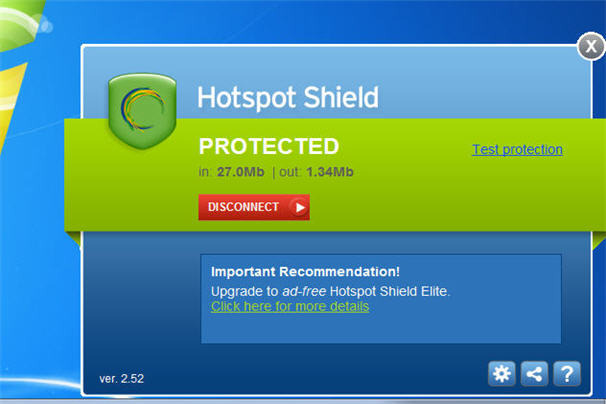
Others prefer Virtual Private Network (VPN) software that encrypts your online sessions. The browser-independent Hotspot Shield from AnchorFree, for example — available for Windows, Macs, iPhone and Android — channels all web activities through a personal VPN and secures all Internet communications by turning all HTTP traffic into the safer HTTPS (which is what your bank uses for a safe connection).
Free to use but with more features packed into the "elite" version ($29.95), Hotspot Shield is ideal for email and instant messaging, too, and reduces the likelihood of identity theft because you're not leaving a digital footprint -- including cyber-snoopers and rogue connections at Wi-Fi hotspots, hotels, airports, and so on.
Similarly, Tor is free software that defends you against Internet surveillance that threatens personal freedom and privacy. Short for "The Onion Router" — which gets its name for its "layered" approach to the encryption process -- Tor provides online anonymity as the software routes Internet traffic through a worldwide volunteer network of servers to conceal your location or online usage patterns.
USB sticks, too

In some cases, software to encrypt your connection is kept on a USB drive — therefore you can remain safe and secure even when using a public PC.
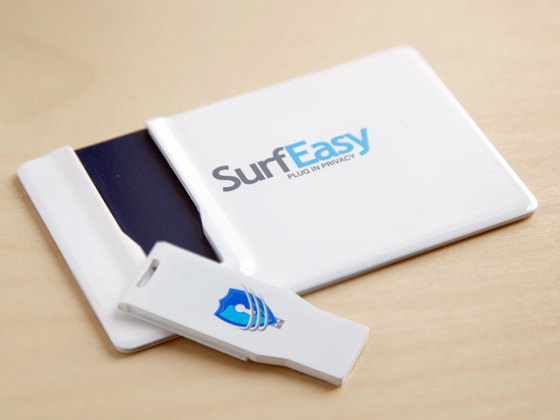
SurfEasy ($59.99) is a tiny USB key that fits into a credit card-shaped case to be kept in your wallet. When you plug it into a PC or Mac -- be it your own computer or a communal one -- it instantly launches its own password-protected browser and you're good to go -- no proxy or network settings to configure.
Your browsing session is handled through SurfEasy's fast and secure private proxy network. Your IP address will be masked throughout the session.
A free alternative is called Tails, which can be downloaded and installed onto a USB stick to run independently of the computer's original operating system.
Like SurfEasy, it lets you browse the web anonymously -- on virtually any computer — as all connections are channelled through the aforementioned Tor network.
Browser tweaks
Anonymous proxy software is a great way to mask your IP address online, but there is still plenty of information about your web surfing habits stored on your computer — which could also be viewed over a network, say, at the office, by your IT department.
At least it's somewhat easy to control your privacy settings directly in your web browser — unless your business forbids non-administrators from making changes to your browser settings, that is.

You can disable cookies — tiny text files stored on your computer with information about where you've been online, passwords and other info — and you should also delete your browser history to cover your tracks. All major web browsers — such as Internet Explorer, Firefox, Chrome or Safari -- allow you to delete your surfing history: simply go to the Options or Settings in your favorite browser and you'll see how to do this.
You might want to turn off auto-complete or someone on your computer could type in a few letters in a search engine or web address (URL) bar and any recent places you visited could fill in automatically. And don't click to allow sites to "remember my password" or someone could gain access to your private or financial information.
The easiest thing to do, however, is to see if your web browser has settings for surfing incognito — most of the major browsers do today. By enabling these privacy settings, your browser won't save any history (and download history), search queries, cookies or passwords.
Ona related note, Twitter recently announced a "Do Not Track" feature that prohibits the service from collecting info about its millions of users. Nice. And Microsoft, in June 2012, said its upcoming Internet Explorer 10 browser -- expected to launch alongside Windows 8 later this year -- will not collect data about the online activity of its users by default.
'Do not track' tools, plug-ins
Google raised a few eyebrows earlier in 2012 with its revamped privacy policy, which was updated to allow for the sharing of information between its various services such as Google Search, Gmail and YouTube. Therefore, if you search for recipes in Google Search you might be presented with cooking-related videos on YouTube. Handy? Sure. Invasion of privacy? Debatable.
You could choose not to log into your Google account when using these services (er, or not use them at all) or you might want to install one of the free browser plug-ins that tell Google and other advertisers to back off.
One called Do Not Track Plus from Abine blocks marketers, search providers and social networks from tracking your online activity — and it's compatible with all major web browsers. After it's installed, a small icon will appear to the right of the browser's address bar to tell you if a website wants to send data from your visit to other companies.

Speaking of requiring a login name and password on a variety of sites, some web-based services like Anonymizer can automatically generate temporary email addresses with unique usernames and passwords for any site you wish to access (excluding your bank or shopping sites, of course, or you can't access your account).
Similarly, another solution called BugMeNot lets users post free usernames and passwords for shared access to popular websites like video sharing sites and newspapers.