Showing posts with label Yahoo News. Show all posts

Friday, July 20, 2012

A Keyboard Made of Bananas & Play-Doh


Even though MaKey MaKey was designed by two Ph.D candidates from MIT, their goal was to make something for the kindergartener in all of us.
It's a device that allows you to turn anything that conducts electricity into a functional computer key. It looks like it might be difficult to hook up, but it's actually very simple - so simple a 4-year old was able to do it without trouble.
The team, Jay Silver and Eric Rosenbaum, have dedicated themselves to designing easy-to-use invention kits. "We believe that everyone is creative, inventive, and imaginative. We believe that everyone can create the future and change the world."
Even the most jaded technology enthusiast can't help but chuckle when they hook up a banana to an alligator clip and use it to scroll through their computer. But the beauty is that it's up to you to decide what to turn into a key.
In Jay and Eric's video they play Mario Bros. with Play-Doh, Dance Dance Revolution with buckets or water, the piano with a staircase, and allowed a cat to take a photo of itself by hooking up a bowl of water to the MaKey MaKey.
The project was launched on Kickstarter with an initial goal of raising $25,000, charging $40 per MaKey MaKey, but the blew past that figure in a day and by month's end they raised over $500,000.
MaKey MaKey starts shipping in August and we look forward to seeing what kind ideas people come up with. When you get yours, take a video of what you come up with and send us the clip.

Wednesday, July 18, 2012

Does New Tree Ring Study Put the Chill on Global Warming?

The density and width of tree rings shows how warm it was during each year's growing season, and thereby serves as a record of long-term climate trends.A new analysis of 2,000 years of tree ring data has quickly made climate change deniers' list of greatest hits to the theory of manmade global warming.
The tree rings "prove [the] climate was WARMER in Roman and Medieval times than it is now," the British newspaper the Daily Mail reported last week, "and [the] world has been cooling for 2,000 years."
That and other articles suggest the current global warming trend is a mere blip when viewed in the context of natural temperature oscillations etched into tree rings over the past two millennia. The Star-Ledger, a New Jersey newspaper, mused that the findings lock in "one piece of an extremely complex puzzle that has been oversimplified by the Al Gores of the world."
[Related: Heat wave blisters, from Maine to Michigan]
However, the study actually does none of the above. "Our study doesn't go against anthropogenic global warming in any way," said Robert Wilson, a paleoclimatologist at the University of St. Andrews in Scotland and a co-author of the study, which appeared July 8 in the journal Nature Climate Change. The tree rings do help fill in a piece of Earth's complicated climate puzzle, he said. However, it is climate change deniers who seem to have misconstrued the bigger picture. [Incompetent People Too Ignorant to Know It]
So, what exactly did the study find? Instead of using the width of trees' rings as a gauge of annual temperatures, as most past analyses of tree rings have done, Wilson and his fellow researchers tracked the density of northern Scandinavian trees' rings marking each year back to 138 B.C. They showed that density measurements give a slightly different reading of historic temperature fluctuations than ring width measurements, and according to their way of reckoning, the Roman and medieval warm periods reached higher temperatures than previously estimated.
That's significant because "if we can improve our estimates for the medieval period, then that will help us understanding the dynamics in this climate system, and help us understand the current warming," Wilson told Life's Little Mysteries.
[Related: Extreme weather convinces climate change doubters]
But it's old news that Northern Europe experienced a natural warm period 2,000 years ago and during the 11th century. Not much is known about the Roman period, but the medieval warm spell primarily resulted from a decrease in volcanic activity, Wilson said. Volcanic ash in the atmosphere tends to block the sun, decreasing Earth's surface temperature.
The current warming, on the other hand, has nothing to do with volcanoes. "None of this changes the fact that the current warming can't be modeled based on natural forces alone," he said. "Anthropogenic [greenhouse gas] emissions are the predominant forces in the late 20th century and early 21st century period."
That Scandinavia may have been slightly warmer in the 11th century than today also doesn't change the fact that the world, as a whole, is warmer now. "This data is spatially specific. You would expect to see this trend in northern Scandinavia, but not in the Alps," Wilson said. "Almost all models show that the current global warming is probably warmer overall than that warming."
[Slideshow: U.S. sweltering in heat wave]
Finally, according to Gavin Schmidt, a NASA climate scientist, the tree rings show what mounds of other data have shown as well: For the past few millennia, Earth's northern latitudes had been cooling down overall. "Similarly, we expect that over the same period the tropics should have warmed slightly," Schmidt said in an email. These trends resulted from shifts in the Earth's orbit on thousand-year-long time-scales.
But Wilson, Schmidt and the vast majority of climate scientists agree: human-caused warming of the entire globe now overwhelms those subtle, regional heat redistributions. World temperatures are now pushing in only one direction: up.

Lady Gaga Debuts Creepy, Nude Ad For New ‘Fame’ Fragrance


Leave it to Lady Gaga to take what could be a tasteful nude and make it as creepy as possible. To promote her debut fragrance called Fame (presumably named after her first album The Fame), the perfume's freshly released print ad features a completely nude Gaga barely covered by strategically placed tiny men crawling all over her!
This certainly isn't the first time that Lady Gaga has appeared practically nude, regularly flashing the goods in strange and skimpy couture pieces and even baring her breasts in fashion editorials (all artfully done, of course). But the fact that Gaga expressed some apprehension about her Fame ad via Twitter makes the image all the more intriguing. If the queen of shock pop is a little nervous, we all should brace ourselves.

[Related: Lady Gaga Reigns As Twitter Queen with 25 Mill Followers]
The singer tweeted, "i won't lie I'm a bit nervous. its been a while since i've shared some work with you. But i'm so proud of Steven+I, we really did not sleep! (sic)." She's referring to Steven Klein, the famed photographer who is known for his edgy, high fashion editorials, designer ad campaigns and has, ironically, worked very closely with Madonna on a number of projects.
At first glance the ad looks like a "Birth of Venus" body beautiful nude of Lady Gaga with something like tarantulas crawling all over her. But upon closer inspection, the infestation are a hoard of body-by-Zeus, Robert Mapplethorpe-esque muscle men free climbing the singer's body. Gaga looks great. The men individually look great. But the way everything was superimposed, the ad could only be the most gratuitous fetish fantasy for some, or a terrifying nightmare for others--not much room for any shade of gray. Just the way Gaga intended, surely.
[Related: Lady Gaga's Meat Dress Comeback In Tokyo!]
Fame will come in two sizes, a more affordable small size to be priced at about $30 and a large size dubbed "Le Masterpiece" expected to be priced at more than $70. Fame will hit stores in September and is promoted as being the very first black-colored eau de parfum that will become invisible once sprayed.
Although the creepy, yet intriguing black and white ad may align more with initial reports of Gaga's debut fragrance being inspired by blood and sperm, luckily for Little Monsters the scent will have more of a traditional "floral and fruity" fragrance.

Would you buy Lady Gaga's new fragrance? What do you think of her new ad? Leave your comments below!

Monday, July 16, 2012

Sylvester Stallone releases statement asking for ‘compassion’ after son’s death

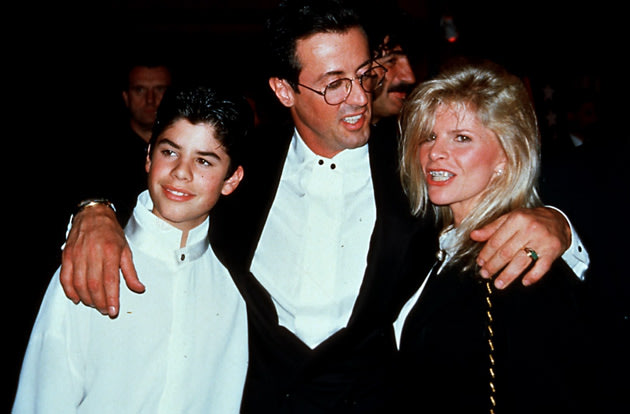
Sylvester Stallone and son Sage. (Wireimage)Two days after his 36-year-old son Sage was found dead, Sylvester Stallone released a statement to the public asking for sensitivity. "When a parent loses a child there is no greater pain. Therefore I am imploring people to respect my talented son's memory and feel compassion for his loving mother Sasha," the 66-year-old actor told TMZ Sunday night. "This agonizing loss will be felt for the rest of our lives," Stallone said. "Sage was our first child and the center of our universe and I am humbly begging for all to have my son's memory and soul left in peace."


He also called for an end to "the speculation and questionable reporting" surrounding Sage's death. Reports circulating on Friday and over the weekend had blamed his death on prescription pills, speculated suicide, and had stated that he been dead anywhere from three to seven days prior to his body being discovered in his Los Angeles area home by a housekeeper on July 13, though initial reports said the police had been called to do a welfare check after Sage had not been heard from for some time.
Sage with his parents, dad Stallone and mom Sasha Czack. (Willi Schneider/Rex/Rex USA)
An autopsy was conducted on Sunday, but the outcome will not be released until the results of the toxicology tests are received.
"We don't know what the circumstances are around it," Sage's attorney George Braunstein told NBC Los Angeles on Sunday. "He was in good health, great spirits. He was thinking of getting married, working on a lot of film projects."

The identity of the girlfriend attorney Braunstein is referring to is not known, but Sage was previously married to a woman named Starlin Wright. The marriage ended in 2008 after a year.


Sage — who played the son of his dad's iconic character, Rocky Balboa, in the 1990 film "Rocky V" — was Stallone's eldest son and one of two children he had with first wife Sasha Czack, whom he split with in 1985 after 11 years of marriage. Stallone went on to have three daughters with his current wife, Jennifer Flavin.
Just a day prior to learning the devastating news, Stallone had participated in a buzzed-about panel to promote his upcoming action sequel "Expendables 2" at San Diego's popular Comic-Con convention on Thursday. He and co-star Arnold Schwarzenegger received standing ovations upon arriving, exchanged jokes, and reminisced about their first meeting over 30 years ago.

Six Careers for People Who Don't Like People


Not a people person? That shouldn't be a problem in these careers.

By Jennifer Berry
Do you long for a job where you can work in peace and quiet, without people constantly bugging you?
If you're not a people person, don't feel like you have to pretend to be one to get a good job, says Nancy Ancowitz, a business communication coach and author of "Self-Promotion for Introverts®: The Quiet Guide to Getting Ahead."
"After all, who wants to interact with a waiter, salesperson, or doctor who would be happier playing the professional equivalent of Solitaire?" Ancowitz asks. "Not everyone thrives in a customer-facing role - particularly the customers you're facing if you're not a people person."
The good news is that you don't necessarily have to be a people person to thrive in every career.
Keep reading to learn about some great options for people who just want to be left alone.

Career #1 - Accountant

Are you happier focusing on spreadsheets and actually getting things done versus listening to coworkers or customers talking all day? Consider career options in accounting.
"As an accountant or auditor, concentrating on solitary tasks involving financial records, budgets, and tax code is far more important than being a social butterfly or showman," Ancowitz says.
In fact, accountants often spend their days organizing and maintaining financial records, according to the U.S. Department of Labor. You might also study your company's financial statements to make sure they're correct, or think about new ways for your company to reduce costs and improve profits.
Click to Find the Right Accounting Program Now.
Education Options: The Department of Labor says "most accountants and authors need at least a bachelor's degree in accounting or a related field."

Career #2 - Technical Writer

Wish you could be left alone with your thoughts a little more - and deal with people a little less? Consider pursuing a career as a technical writer and you just might get your wish.
"Many writers live a rich life inside their own heads," Ancowitz says. "Depending on what type of writing you do, your need to interact with the outside world may be more dependent on how well you stock your fridge than a burning need to 'party.'"
As a technical writer, for example, you might write instruction or operating manuals, says the U.S. Department of Labor. That could mean spending your days gathering and organizing technical information, and figuring out how to explain complicated products or processes so customers can understand them better.
Click to Find the Right Communications Program Now.
Education Options: According to the Department of Labor, a college degree is usually required. You might want to consider earning it in journalism, English, or communications, as these are degrees employers generally prefer, says the Department.

Career #3 - Graphic Designer

Do you dream of spending your days alone with your creativity, uninterrupted by noisy coworkers or customers? Consider pursuing a career as a graphic designer and your creativity might get to flow without interruption.
"The rest of the world mainly uses words to express themselves and visuals are an afterthought," Ancowitz says. "But for [graphic designers], visuals are your mother tongue and words may not flow so easily. You may enjoy lots of downtime so you can allow your creative thoughts to swirl around your head."
However, Ancowitz warns that some offices may come with coworkers that "may distract you from your creative process," so you'll want to pick and choose where you work wisely.
So what exactly do graphic designers do? According to the U.S. Department of Labor, they often need to figure out what clients need and how to best communicate their message visually. As part of the job, they might create logos or develop layouts for advertisements.
Click to Find the Right Graphic Design Program Now.
Education Options: The Department of Labor says graphic designers usually need a bachelor's degree in graphic design or a related field. The Department also notes that you'll need a good portfolio when it comes time to look for work - so make sure to focus on developing a strong body of work while you're in school.

Career #4 - Software Developer

Do you prefer the reliability of machines to the unpredictability of people? You might want to consider pursuing a career as a software engineer.
"A lot of your work will probably entail sitting for hours on end at your computer rather than sitting at meetings all day," Ancowitz says.
And if you really want a workspace you're comfortable with, you'll probably be thrilled with this bit of news: Many software developers are able to telecommute to work, says the U.S. Department of Labor. This could be perfect for people who don't like the distractions of a busy office.
In terms of what you'll be doing, the Department of Labor says that as a software engineer, you might spend your days designing applications or even testing your software to make sure it works correctly.
Click to Find the Right Computer Science Program Now.
Education Options: Software developers generally have a bachelor's degree in computer science, software engineering, or a related field - though a degree in math might also be okay for some employers, according to the Department.

Career #5 - Medical Laboratory Technician

Are you happiest when you know exactly what you need to do, following specific instructions to the letter? You might want to consider a career as a medical laboratory technician.
"Medical lab technicians often work with one patient at a time as well as behind-the-scenes," Ancowitz says. "This job may be appealing to you because it doesn't entail campaign speeches, back-to-back meetings, or nonstop schmoozing."
In fact, one of the things you might do as a medical lab technician working under the supervision of a medical laboratory technologist or laboratory manager is collect samples of body fluids, tissue, or other substances from patients - and then perform tests on them, says the U.S. Department of Labor.
Click to Find the Right Medical Laboratory Technician Program Now.
Education Options: You'll usually need a medical laboratory technician associate's degree or certificate to get started in this field, says the Department of Labor. Check and see if your state requires medical laboratory technicians to get licensed or certified as well.

Career #6 - Information Security Analyst

Do you like the idea of thwarting criminals before they can cause major damage - but don't want to deal with people face to face? Consider preparing to pursue a career as an information security analyst.
"This is another career that is great for those who like to remain behind the scenes," Ancowitz says. She notes that this could be perfect for someone who's "got the mind of a sleuth, the energy of a watchdog, and the patience and persistence to solve complex technical problems."
The U.S. Department of Labor says information security analysts can use firewalls and data encryption programs to protect their company's computer systems from cyber attacks. You may also spend a lot of time keeping up-to-date on the latest cyber attacks and new security technology.
Click to Find the Right Computer Science Program Now.
Education Options: The Department of Labor says information security analysts generally need a bachelor's degree in computer science, programming, or another computer-related field. The Department also notes that employers prefer analysts who've earned their master's in business administration (MBA) in information systems.


Original Post Found Here..

Wednesday, July 11, 2012

Mystery illness in Cambodia solved, doctors say


Watch this video

STORY HIGHLIGHTS
  • Doctors say the inappropriate use of steroids worsened many cases
  • No new cases of the condition have been confirmed since last Saturday
  • The pathogens include enterovirus 71, streptococcus suis and dengue
  • Most of the patients have come from southern Cambodia
Phnom Penh, Cambodia (CNN) -- The cause of a mysterious illness that has claimed the lives of more than 60 Cambodian children has been determined, medical doctors familiar with the investigation told CNN on Wednesday.
A combination of pathogens, disease-causing micro-organisms, is to blame for the illness, the World Health Organization, in conjunction with the Cambodian Ministry of Health, has concluded, the doctors said.
The pathogens include enterovirus 71, which is known to cause neurological disease; streptococcus suis, which can cause infections like bacterial meningitis in people who have close contact with pigs or with pork products; and dengue, which is transmitted by mosquitoes.
The inappropriate use of steroids, which can suppress the immune system, worsened the illness in a majority of the patients, the doctors said. The World Health Organization (WHO) is expected to advise health care workers to refrain from using steroids in patients with signs and symptoms of the infection, which include severe fever, encephalitis and breathing difficulties.
While not all the microorganisms were present in each patient, doctors concluded the illness was caused by a combination of them and worsened by steroid use.
The WHO sources did not want to be identified because the results of the health organization's investigation have not yet been made public.
"I'm very confident for the reason of the epidemic," said Dr. Phillipe Buchy, chief of virology at the Institut Pasteur in Cambodia and one of the doctors who cracked the case.
"The first thing that goes through your mind is, is this one of the usual suspects you haven't detected before?" said Dr. Arnaud Tarantola, chief of epidemiology and public health at the Institut Pasteur. "If it is, has it mutated, or changed in a way that it causes more severe disease? Or is it something completely new?"
On the steroids issue, Tarantola said, "When you have a dying child, you try to use what you have at hand, and they were right to try that." But, he acknowledged, "from the cases we reviewed, almost all of the children died, and almost all of them had steroids."
"I think we can close the case and move ahead asking different questions," Buchy said. "Not what is the illness, but now, how long has the virus been circulating? What is the extent of the circulation of the virus? How many mild diseases are we missing? That's the next step."
Over the past four months, doctors at Kantha Bopha Children's Hospitals in Phnom Penh have been faced with the mysterious syndrome, which kills children so fast that nearly all of those infected with it die within a day or two of being admitted to the hospital.
Dr. Beat Richner, head of the children's hospitals -- which cared for 66 patients affected by the illness, 64 of whom died -- said that no new cases of the illness had been confirmed since Saturday.
Other hospitals in the country have reported similar cases, but far fewer than the children's hospitals in the capital, which are the most popular.
In the last hours of their life, the children experienced a "total destruction of the alveola(e) in the lungs," Richner said. Alveolae are the air sacs where oxygen enters the bloodstream.
Most of the children who have contracted the illness have come from the south of the country, though health officials cannot find what is known as a cluster -- a lot of cases coming from one specific area.
By June 29, the WHO had been contacted and Cambodian officials were scrambling to instruct health providers across the country to spread information about the illness as quickly as possible.
The WHO and the Cambodian authorities' announcement of the situation drew criticism from Richner, who said they were "causing unnecessary panic."
The WHO said the unexplained nature of the outbreak obliged it to communicate the information.
Over the weekend, lab tests linked enterovirus 71 (EV71) to some of the cases. But the tests didn't solve the whole puzzle and health officials continued their investigations, noting the detection of other elements like streptococcus suis and dengue.
The link to EV71 does not particularly help in the treatment of the illness, as there is no effective antiviral treatment for severe EV71 infections and no vaccine is available.
In milder cases, EV71 can cause coldlike symptoms, diarrhea and sores on the hands, feet and mouth, according to the journal Genetic Vaccines and Therapy. But more severe cases can cause fluid to accumulate on the brain, resulting in polio-like paralysis and death.
Outbreaks of the enterovirus "occur periodically in the Asia-Pacific region," according to the CDC. Brunei had its first major outbreak in 2006. China had an outbreak in 2008.
Adults' well-developed immune systems usually can fend off the virus, but children are vulnerable to it, according to the CDC.
"It looks like (EV71) has emerged strongly, probably because it hadn't circulated with the same intensity in the past years," Tarantola said.
Reported cases of streptococcus suis have risen significantly in recent years, notably in Southeast Asia, according to a paper that appeared last year in Emerging Infectious Diseases, a journal published by the Centers for Disease Control and Prevention in Atlanta.
The rainy season in Cambodia, which lasts from May to October, is a key problem in trying to control diseases like dengue. Because of a lack of indoor plumbing in many homes, people collect rainwater in vats, creating potential breeding grounds for mosquitoes.
In Cambodia, as with many places around the world, parents first try treating their child at home. If that doesn't work, they typically then go to a local clinic. A hospital visit, which often involves a long trip, is a last resort.

Think it's hot? Imagine living here


A surface temperature of 159 degrees was detected seven years ago in Iran's Lut Desert, according to a recent study.

A surface temperature of 159 degrees was detected seven years ago in Iran's Lut Desert, according to a recent study.

STORY HIGHLIGHTS
  • Scorching temperatures in the U.S. are common for many other countries
  • The world's highest air temperature was recorded in El Azizia, Libya, in 1922
  • But weather stations aren't in some of the world's hottest spots, scientists say
(CNN) -- For many Americans, the past month has been miserably hot.
Heat advisories and warnings have been issued from coast to coast, with high temperatures often reaching into the triple digits. More than 4,500 record highs have been set across the country in the past 30 days, according to the National Climatic Data Center.
But in certain parts of the world, this is the norm -- or maybe even on the cool side.
Try Kuwait City, for instance. In July, its average high temperature is 116 degrees Fahrenheit.
Or Timbuktu in Mali, where the highs average 108 in May and was once recorded at 130. 130! That ranks fifth on the all-time list.
The highest temperature ever recorded on the planet was in 1922, when a thermometer in El Azizia, Libya, hit 136. Some dispute that mark, saying it was improperly measured. If that's true, the record would be the 134, reached nine years earlier in Death Valley, California.
But the world's hottest place might not be any of these, according to a team of scientists from the University of Montana. It says the highest temperatures on Earth are found in areas that don't even have weather stations.


Photos: Extreme heat strikes U.S.  
Photos: Extreme heat strikes U.S.

Heat Wave: Triple digits
"The Earth's hot deserts -- such as the Sahara, the Gobi, the Sonoran and the Lut -- are climatically harsh and so remote that access for routine measurements and maintenance of a weather station is impractical," said David Mildrexler, lead author of a recent study that used NASA satellites to detect the Earth's hottest surface temperatures.
The satellites detect the infrared energy emitted by land. And over a seven-year period, from 2003 to 2009, they found Iran's Lut Desert to be the hottest place on Earth.
The Lut Desert had the highest recorded surface temperature in five of the seven years, topping out at 159 degrees in 2005. Other notable annual highs came from Queensland, Australia (156 degrees in 2003) and China's Turpan Basin (152 degrees in 2008).
It's important to stress that surface temperatures are naturally higher than the air temperatures measured by weather stations. Air temperatures have to be measured by thermometers placed off the ground and shielded from sunlight, according to global meteorological standards.
But the study shows that today's modern records might not necessarily be the most accurate.
"Most of the places that call themselves the hottest on Earth are not even serious contenders," co-author Steve Running said.
The world's highest recorded air temperatures 1. El Azizia, Libya (136 degrees Fahrenheit)
2. Death Valley, California (134)
3. Ghadames, Libya (131)
3. Kebili, Tunisia (131)
5. Timbuktu, Mali (130)
5. Araouane, Mali (130)
7. Tirat Tsvi, Israel (129)
8. Ahwaz, Iran (128)
8. Agha Jari, Iran (128)
10. Wadi Halfa, Sudan (127)
Highest recorded air temperature (by continent) Africa: El Azizia, Libya (136)
North America: Death Valley, California (134)
Asia: Tirat Tsvi, Israel (129)
Australia: Cloncurry, Queensland (128*)
Europe: Seville, Spain (122)
South America: Rivadavia, Argentina (120)
Antarctica: Vanda Station, Scott Coast (59)
Sources: NOAA, World Meteorological Organization
* This temperature was measured using the techniques available at the time of recording, which are different to the standard techniques currently used in Australia. The most likely Australian record using standard equipment is an observation of 123 degrees, recorded at Oodnadatta, South Australia.

Original Post Found Here..

7 Easy Ways to Add Years to Your Life


You may have read recently that New York City residents are outliving the rest of America. According to researchers at the University of Washington, the life expectancy of the average New York City resident is 80.6 years—three years above the national average. What’s more, a New Yorker’s average life expectancy grew a staggering 13.6 years between 1989 and 2009.
The researchers credit the extra years to the New York Health Department’s commitment to curbing the Big Apple’s worst habits: They’ve banned trans fats, added calorie counts to menus, and encouraged physical activity with more bike lanes and walking paths.
But, trust me, New Yorkers haven’t cornered the market on healthy living. In fact, here are 7 simple ways anyone, in any part of the world, can break their date with death.

Skip the Soup, Order the Salad

Italian researchers found that eating as little as 1 cup of raw vegetables daily can add 2 years to your life. Why raw? Cooking can deplete up to 30 percent of the antioxidants in vegetables. To eat your quota, fill a ziplock sandwich bag with chopped red and green peppers, broccoli, and carrots. Toss the bag into your briefcase, along with a packet of dressing—the fat will boost your body's absorption of certain nutrients. Just remember: Not all restaurant salads are good for you! Beware of the 20 Salads Worse Than a Whopper.

Stop Drinking Sugar

Many see New York Mayor Michael Bloomberg’s proposed ban on sweetened drinks larger than 16 ounces is an infringement of their rights. Perhaps it is. But make no mistake: Sugar-laden drinks are killing you. New research in Circulation links men’s sugary drink consumption to an increased risk of heart attack.
Meanwhile, scientists at Loma Linda University found that men who consume five 8-ounce glasses of water each day are 54 percent less likely to suffer a fatal heart attack than those who drink just two glasses or less every day. Hmm . . .
Drop pounds and live longer with Drink This, Not That!, the essential guide to the most popular beverages in restaurants and on supermarket shelves.

Crack Open Some Nuts

When Loma Linda University researchers tracked the lifestyle habits of 34,000 Seventh-Day Adventists—a population famous for its longevity—they discovered that those who munched nuts 5 days a week earned an extra 2.9 years on the planet.
Try the Planters NUT-rition Heart Healthy Mix, developed in conjunction with Men’s Health nutrition team. It contains all five key nuts, including walnuts, which are usually left out of nut mixes. Aim to eat 2 ounces a day.

Cut Calories the Easy Way

In 2008, New York became the first U.S. city to require calories on menu boards at fast food and chain restaurants. Now the Food and Drug Administration is working to make it a national requirement—and with good reason. A recent Health Psychology study found that when we’re given visual portion indicators, we tend to eat less.
We all know the havoc excess body fat can cause: It raises your risk of diabetes, heart disease, stroke, and colon cancer. It also brings the reaper to your door sooner. University of Alabama researchers discovered that maintaining a body-mass index of 25 to 35 can shorten your life by up to 3 years. A healthy BMI is between 18.5 and 24.9.
You’re not doomed if your local menus don’t flaunt calories. Nor do you have to spend hours online every day tracking down nutrition data. Start here: Avoid add-ons like cheese, goopy sauces, and mayonnaise, says Elizabeth Gross Cohn, R.N., D.N.Sc., an associate nursing professor at Columbia University. And wash everything down with water.

Explore Your Environment

A 2011 study in Transportation found that increased availability of bike lanes means more people bike to work. (Shocker!) And while New York isn’t a cyclist’s paradise—that would be Portland, perpetually ranked the top cycling city by Bicycling magazine—Gotham is pushing the hardest to catch up, says Ralph Buehler, one of the study authors and an assistant professor in Urban Affairs and Planning at Virginia Tech.
Not every city is known for its bike lanes, but most are building initiatives to keep their communities in shape: hiking programs in the mountains, kayaking on large lakes, or webs of running trails (here's proof: our list of the 20 Coolest Triathlons in America). You can jog anywhere—and doing so for just an hour a week can add 6.2 years to your life, according to a Danish study.

Phone a Friend Regularly

In a study of seventysomethings, Australian researchers found that those with the largest network of friends had the longest lease on life. For the average guy, this could add up to 7 additional years of existence.
Yes, some buddies may encourage risky behavior from time to time, but friendship ultimately provides more protection than peril. So try to learn a few new faces at work, trade lifting tips at the gym, or simply say “hey” to that neighbor you've never met. You’ll have many years together to thank each other.

Above All, Remember That There’s Life After Retirement

In a Yale University study of older adults, people with a positive outlook on the aging process lived more than 7 years longer than those who felt doomed to deteriorating mental and physical health.
Already envisioning decades of decrepitude? Volunteer for a cause you're passionate about: Selfless actions can put a positive spin on life and distract from unhealthy obsessing, reports a study in Psychosomatic Medicine.

Tuesday, July 10, 2012

How Republicans plan to win over the youth vote


Four years after Barack Obama won the support of 66 percent of voters aged 18 to 29, Republicans are working on a fresh approach to bring younger voters and candidates into the fold, using a coalition of traditional campaign organizations, super PACs, nonprofit advocacy groups and policy-based think tanks.
And even Republicans organizing these efforts admit it's going to take some work.
Two groups, the Young Guns Action Fund and Maverick PAC—the latter was co-founded by George P. Bush, nephew of former President George W. Bush and son of former Florida Gov. Jeb Bush—will focus on finding young Republican political talent and supporting them with money. The two organizations announced a strategic partnership Tuesday that organizers hope will increase engagement with voters that were lost to Obama in 2008. One short-term goal, of course, is to narrow the enthusiasm gap between young Republicans and Democrats, but ultimately, they're looking far beyond the next election.
"The relationship is about developing something for the long-term that looks past just this November," YG Action Fund President John Murray told reporters during a breakfast meeting in Washington, D.C., on Tuesday. "By the midterms in 2014, perhaps we've made a little more progress; by the next presidential we've made some more progress, and [we've gained] ... the capacity to build that over time because it's going to take time."
Here's how the partnership will work: The YG Action fund, a super PAC, will scour the country looking for new young Republican House and Senate candidates. (The group is similar to, but independent from, the National Republican Congressional Committee's "Young Guns" program.) The Action fund will support these new GOP candidates and independently bolster their campaigns. Meanwhile, MavPAC will build its own base of young, new donors and fundraising bundlers, whom they plan to connect with the new recruits. The two groups will share data based on the information they gather from new supporters. They plan to spend $5 million this election cycle on the joint project.
YG Action Fund will recruit the pilots and cover the air war, while MavPAC rallies the boots on the ground.
Organizers say they hope to make some headway with younger voters this cycle, but they aren't promising a Republican revolution by November.
"We want to manage expectations," said MavPac co-founder Bush. "We don't want to say it's going to swing 180 degrees to the other side. I think it's worth the effort. I think to leave a complete demographic group like this uncontested is a mistake for the Republican Party."
To reach the goal, MavPAC and YG Action Fund leaders both pointed to Obama's success four years ago, and how he was able to "capture the imagination" of young people in his speeches. Now, they say, many of those same voters have graduated from college, are struggling to find work and are disappointed. Republicans plan to capitalize off that frustration.
"I am not here to say that there's some magic wand we're going to wave and all these voters are going to suddenly vote Republican," Murray said. "I think what we recognize is that there's a unique moment in time where there's a real choice being presented in this country, and many of these voters, once you articulate that voice, tend to say, 'You know, I want this freedom and opportunity, and I'm concerned about it.'"
MavPAC and YG Action aren't the only groups focused on shoring up the Republican base of young voters this cycle. American Crossroads, a group co-founded by Republican operatives Karl Rove and Ed Gillespie, announced the formation of Crossroads Generation earlier this year. In 2010, conservative operatives launched Generation Opportunity, which conducts nationwide voter registration drives targeting the younger set. Free from the restrictions of campaign finance laws, those independent groups will work to amplify the efforts of traditional party organizations.
Said YG Action Fund spokesman Brad Dayspring: "There's an opportunity to capture the imagination of those voters."

The Original Post Found Here..

25 (more) awesome iPhone tips and tricks


What's the only thing better than 25 ways to master your iPhone? 25 more.
In case you missed our first round-up of 25 assorted iPhone tips and tricks, be sure to read these simple ways you can get more out of your smartphone investment.
In the first post we covered everything from how to dry out a wet iPhone and fixing those dang "autocorrect" issues to using the phone cord to take a picture (and why) and making your own ringtone without having to pay your carrier.
And now we've got another 25 awesome things to try with your iPhone, many of which you weren't aware of.
And hey, if you have any tips of your own to share, be sure to leave them in the Comments section at the bottom — so you can get credit where it's due.
Here we go:
Turn iBooks into audio books: Like most smartphones, the iPhone has a number of accessibility options. One feature is called VoiceOver and it can read aloud any text on the screen. While designed primarily for the seeing impaired, anyone can take advantage of this feature if they want to turn an e-book into an audiobook. Now you can listen while commuting to and from work, while closing your eyes in bed or when jogging down the street. To activate it, go to Settings, then General, followed by Accessibility. Finally, swipe to change VoiceOver from Off to On. You'll also be able to tweak settings, such as the speed of voice reading to you. She sounds like the voice of Siri, by the way.
Quick access a draft email: You probably know you can start an email and save it as a draft to finish or review at a later time -- if not, when you're typing an email, tap Cancel and then select Save Draft — but here's a super quick way to access your message draft when you're ready to continue working on it: Open up the Mail app, touch and hold the Compose button (the icon of the small pencil in the square) and after a second or two it'll automatically take you to your last saved message draft. Neat, huh? Otherwise, you need to open Mail, select the email account, select Drafts and then find the message.
Send multiple photos at the same time: To send multiple photos to the same contact (say, in an email or iMessage), open the Photos app and then tap on an album, such as Camera Roll. Now tap the Select icon in the top right of your iPhone screen. Now you can tap to choose any photo you'd like to send to someone. Once you've selected the desired pics, tap Share in the bottom right of the screen and you'll have three options: Email, Message or Print.
Tell Siri the entire email: iPhone 4S owners probably go through a lengthy back-and-forth with Siri just to compose an email. Most people say the person's name and then, when prompted, the subject line, and finally, the body of the email. But did you know you can do it all in one fell swoop? For example, hold down the home button and say "Remind my wife about the party and say don't forget to pick up a bottle of red wine tonight." Siri will know who your spouse is (or will ask you once) and place that in the To: field, and because you said "about" the party, Siri knows you want that in the Subject (Re:) field. You also said "and say," which places words you said after that into the body of the email. This will all save you time.
Close open apps to save battery life: Make sure apps you're no longer using are not open and draining the battery. Do this by double-tapping the Home button and you'll see all the recently used apps running in the background along the bottom of your phone -- such as a GPS app you no longer need because you've reached your destination. Press and hold an icon and they'll all jiggle, which means you can tap the X to close the open apps at the bottom of your iPhone.
Tweet from any app: If you scour comments and message boards on the web you'll find iPhone users who complain the integrated Twitter support isn't working for them. Chances are it's because they didn't know they had to sign in first — but it's only required once. Go to Settings on your iPhone, select Twitter (look for the little white bird on a blue background) and enter your Twitter handle (or email) and password. Now, you can tweet directly from apps like Safari, Photos, Camera, Maps and YouTube. Also remember that you can start typing a friend's Twitter handle and the iPhone will autocomplete the rest.
Undo the Bluetooth "ignore" command: If you've ever paired Bluetooth products with your iPhone then you're likely aware you can also choose to "Ignore This Device." There are different reasons why you'd want to do this, but sometimes you tap this option accidentally or you might change your mind after the fact. Now you won't see the wireless gadget you want to pair with. What to do? To have it show up on the list again, simply turn off your iPhone by pressing and holding the power button (on top of the phone) for a few seconds and then swipe to shut down. When you boot back up again you'll see the Bluetooth device you previously ignored.
Siri can handle Facebook, Twitter: The iO6 update will add native Facebook and Twitter support this fall, but until then, you can still use your voice to tweet or update your status. It involves setting up these popular social networking services to work with text messaging. For Facebook, text the word "hello" to 32665 (which spells FBOOK on a traditional keypad). You'll get an automated reply on your phone with a link to click to finish the setup. Finally, add the short code to your address book and rename it "Facebook." Now you can tell Siri "Text Facebook," followed by your status update. It's the same process for Twitter, as you'll want to enable mobile updates by sending a short code to Twitter. Then you'll add the short code to your Contacts, name it "Twitter" and then instruct Siri to send a message there. To get going, text the word "start" to 40404 (U.S.) or 21212 (Canada).
Lock the screen orientation: Does it drive you nuts to have the iPhone screen flip around when you rotate the phone? You can prevent this from happening if you have no desire to swap between portrait and landscape view. Simply choose the orientation you prefer by tilting the device and then double-click the Home button. This will bring up the multitasking interface at the bottom of the iPhone. Now swipe from left to right and you'll see a "portrait orientation lock" icon at the very left of this string of apps (it has a circular arrow on the icon). Tap it once to lock your orientation and you'll see a padlock appear. Turn it off by tapping it again.
Add PDFs to iBooks: You don't need to spend money on apps that let you read Adobe PDF (Portable Document Format) files. Instead, if you get a PDF as an attachment in an email, or see one on a website in Safari (or another iPhone browser), simply press and hold the PDF icon or link and you'll see an option appear called "Open in iBooks." Select this and you'll be able to read the PDF in the iBooks app. In fact, all your PDFs will now be stored here. Simply tap the word Books in the iBooks app (top, center of screen) and now select PDFs to see them all on the virtual bookshelf. You can delete them from this screen, too, if desired.
Master the keyboard: In the first 25 Awesome iPhone Tricks post we cover how to add your own shortcuts and quickly accept or refuse autocorrect suggestions. But here's a few other keyboard related tips: tap the space bar twice and the iPhone will add a period and capitalize the next word; quickly capitalize a word by pressing on the Shift (arrow) button and dragging your finger to the first letter of the word; to enter a number or symbol quickly, touch and hold, then select the key you want (lifting your finger returns you to the alphabet keyboard); and touch and hold a letter to reveal a list of special characters, such as à, á, â, ä, æ, ã and å, when you press and hold on "a." Hey, now you can type "Mötley Crüe" properly.
Siri is a verbal calculator, too: You might know Siri on iPhone 4S can give you facts and definitions on-demand but "she" can also solve math problems for you, too (this is where students, off for the summer say "so NOW you tell me"). Just give Siri a verbal task, be it addition, subtraction, multiplication, division, equations or fractions — and you'll see (not her) the answer on the screen. Better yet, this is very handy when figuring out tip at a restaurant. For example, say you're out with three friends and the bill comes to $300. You can ask Siri something like "What's a 20 percent tip on $300, for four people?" and Siri will tell you everyone owes $15.
Swipe to delete messages: This one is pretty simple, but you'd be surprised how many people do it the longer way: to delete an unwanted email, text message or voicemail without opening them, just swipe across the message from right to left when you see it in list view and tap the red Delete button. Instead, many iPhone users waste time by opening up each and every message and tapping the small trash can at the bottom of the screen. On a related note, you can delete unwanted emails in bulk rather than deleting one at a time: In your Inbox, simply click the Edit button and check off the emails you want to delete with your finger and then choose Delete.
Tap to focus the camera: Those who regularly use the iPhone as a camera might know this simple trick: When you're snapping photos or shooting video on your iPhone — and seeing the subject on your screen as you line up the shot -- tap the screen where you want to iPhone to focus and it'll adjust the exposure and white balance automatically for that area. For example, you might want your friend's face in perfect focus or might opt for a more artsy shot of the sushi they're holding in their chopsticks by focusing the camera on the food. You get the idea.
Manage your camera time: Here's another tip when using the camera. Unless you're running out of room, never delete unwanted photos from your iPhone when you're out. Why? You really don't know what the photo looks like until you see it much bigger on a computer monitor (it may be better than you think and/or fixable with software). Plus, spending time deleting photos on your smartphone right after you took them means you might miss an awesome shot because you're not paying attention. And finally, deleting photos and videos off your iPhone unnecessarily drains the battery.
Add folders to the dock: Since iOS 4, you've been able to create a folder to store many similar apps on your home screen — this helps you better group your programs and find them easier. (Just press and hold an app until they squiggle, then drag and drop it onto another app). But did you know you could also create folders and add them to your dock at the bottom of the iPhone? Once you've got your folders created — and you can create or edit the name for the folder by pressing and holding the icon — simply drag it to the bottom of the iPhone screen for easy access. You can only have four icons at a time, so you might gave to move one there to your homescreen to make room.
Hold your iPhone like a camera: If you don`t like take a photo on your iPhone by pressing the virtual shutter button on the screen — after all, it's not the most comfortable and could cause the iPhone to shake when you snap the picture — then remember you can now take a photo by pressing the volume button on the side of your iPhone, which will be on top — in the same place as a shutter button on a regular camera!
Preview that picture: On a related note, if you want to preview the photo you just took, just drag your finger from left to right in the Camera app for a preview. Most people will tap the icon in the lower-left of the screen and open up the photos manually. If you haven't taken any photos or videos lately, swipe from left to right in the Camera app will start to show your Camera Roll, from newest to oldest, as you continue to swipe along.
Easily control your music: When you're listening to music on your iPhone and using the earbuds that shipped with them, you might be aware you can press once on the small controller in the middle of the headphone cord to pause the music, and press again to play. But did you know you could quickly double tap to skip to the next song and triple-tap to listen to the previous song? Also, iPhone 4S users can use Siri to play music, such as saying "Play Jay Z" or "Play other music like this" or "Play playlist workout mix."
Quickly add a calendar entry: You might've noticed when reading an email in the Mail app it'll automatically underline anything related to date and time. For example, you're typing to your buddy something like "Don't forget we're hooking up for drinks on Friday afternoon." iPhone will detect this is a date or time and will convert it to a link -- your friend will see "on Friday afternoon" underlined and in blue — and they could tap the link to add the event to their calendar.
Sync it all: Computer? What computer? You need not connect your iPhone to your PC or Mac every again if you activate the iCloud service. Automatically back-up your iPhone information to iCloud by going to Settings, iCloud and finally Storage and Back-Up. Also, be sure to select what gets synched over Wi-Fi (or if you prefer, 3G, too, though be aware of data costs). You can choose to sync Mail, Contacts, Calendars, Reminders, Bookmarks, Notes, Photos and more. You get 5GB of free storage through iCloud, but can pay for more if you like. Also, while here, activate "Find My iPhone" so you can track your phone if missing or stolen (see here).
Enable restrictions: Whether it's on your iPhone or your child's iPod touch or iPad, you can block inappropriate content from your kids (such as music with explicit lyrics), prevent them from buying apps (or in-app purchases) and block YouTube, Safari, FaceTime and more. To enable restrictions — and then customize what they're able to access -- go to Settings, General, Restrictions and tap "Enable Restrictions." You will first be promoted to select a 4-digit passcode before choosing which content and apps can be accessed.
Delete your memory-hogging apps: Beginning with the iOS 5 update, you can see how much space your apps are taking up on your iPhone and delete them from your device — even a bunch at once. To do this, tap Settings, followed by General and finally, Usage. From here you'll see a list of all your apps and their file size. If you see that Max Payne game is 1.3 Gigabytes and you don't play it anymore, tap to delete it. You can always reinstall it later of via iCloud, App Store or your computer.
Save battery by turning off "pushed" data: Another way to prolong battery performance is to off push notifications in email, instant messaging and other applications that constantly ping a server to push real-time notifications to your smartphone. That is, if you don't need to know this kind of information right away. In Settings, select the option that says Mail, Contacts and Calendars, tap "Fetch New Data" and change it from Push to Every 30 Minutes, Hourly or Manually.
Turn on the "Emoji" (emotions) keyboard: Ever notice how some of your friends have cute little emoticons in their emails or text messages. You know, like a little yellow face with hearts for eyes, teddy bears, Christmas trees, and so on? By default, your iPhone doesn't give you access to these emotions and other graphics — but it is stored on your phone and ready when you are. To enable the Emoji keyboard, go to Settings, then General and finally Keyboard. Once inside, tap International Keyboards and "add" new keyboard. Select "Emoji." Now, when typing an email or text, tap the globe key near the space bar for these new options. Tap it again to return back to English.

The Original Post Found Here..
 

Wednesday, July 4, 2012

The Amazing Spider-Man (2012)


Peter Parker finds a clue that might help him understand why his parents disappeared when he was young. His path puts him on a collision course with Dr. Curt Connors, his father's former partner. 

Storyline

Like most teenagers, Peter is trying to figure out who he is and how he got to be the person he is today. Peter is also finding his way with his first high school crush, Gwen Stacy, and together, they struggle with love, commitment, and secrets. As Peter discovers a mysterious briefcase that belonged to his father, he begins a quest to understand his parents' disappearance - leading him directly to Oscorp and the lab of Dr Curt Connors, his father's former partner. As Spider-Man is set on a collision course with Connors' alter-ego, The Lizard, Peter will make life-altering choices to use his powers and shape his destiny to become a hero.


The untold story? Not quite, but a well-told story? Definitely.


After Spider-Man 3 became something of a critical and commercial letdown and plans for a sequel fell through, the folks at Marvel Entertainment and Columbia Pictures developed a case of itchy reboot button syndrome and immediately put The Amazing Spider-Man into production to swing in and save the franchise. Many fans rolled their collective eyes and the web was abuzz with fiery opinions. Early looks and promotional materials seemed generally underwhelming, and the film quickly became buried by bigger releases such as The Avengers, The Dark Knight Rises and Prometheus. However, this spider has become something of a dark horse and has somehow risen to greet detractors with a shot of webbing to the face.

In spite of the poor first impressions, one would be hard-pressed not to admit that The Amazing Spider-Man is actually a competently-made, enjoyable flick. The approach that the aptly-named director Marc Webb of (500) Days of Summer fame took brings to mind last year's surprise hit Marvel flick X-Men: First Class, in that in combines the youthful appeal of teen drama with relatively large-scale super heroics and action sequences. This film does not repeat the mistakes of Spider-Man 3 – instead, we have character development and interaction and clear and easy-to-follow plot progression.

Spider-Man has always been a hero all readers could relate to, with his transition from outcast to hero and his various personal, real-world struggles. Andrew Garfield, sexy nerd incarnate, is an ace casting choice. The actor has said that playing Spider-Man has been his dream since he was a young boy and the role went to the right guy. Garfield has an effortless, genuine charm and his slightly lanky proportions do seem very reminiscent of the Peter Parker of the comics, particularly the Ultimate version. For all the strengths of Tobey Maguire's interpretation of the character, Garfield's somehow rings more true. Whether he's being a smart-mouthed do-gooder, a teen sorting out his issues with his well-meaning aunt and uncle or a young lover unsure of how to go about a relationship with his dream gal, Garfield is in great form.

Speaking of his dream gal, Emma Stone does a similarly good job of playing Gwen Stacy. Many were confused after Stone was cast and then announced as playing a different character from Kirsten Dunst's. Gwen did pop in Spider-Man 3 played by Bryce Dallas-Howard, and is touted as Parker's first love. In an interview, Stone states that "Mary Jane fell in love with Spider-Man, but Gwen Stacy fell in love with Peter Parker". Gwen is smart, kind and funny, surely what every guy looks for in a girl, and her role in the story is just the right size. Sure enough, the chemistry between Stone and Garfield is among the strongest of on screen couples in recent memory and it's no surprise that the couple continued their romance off the set.

One has to feel bad for Dylan Baker who portrayed Dr Curt Connors in Spider-Man 2 and 3 but never got the chance to transform into the Lizard after the cancellation of a fourth entry in Raimi's series. Rhys Ifans fills those shoes, and he marshals a tragic figure who hopes to better society and to fix his own perceived physical flaw. This definitely will push the excellent actor further into public consciousness, and he does a decent job. However, Connors' split-second snap from rational scientist to raving mad supervillain does seem a tad rushed and the design of the Lizard, as has been stated before, is pretty goofy. Also, the relationship between Connors and Parker, while given some attention here, could have benefited from a little mo re.

The rest of the supporting cast is good too. Martin Sheen is easy to buy as the earnest, down-to-earth uncle and father figure who serves as an upstanding role model to his nephew, and so is Sally Field as his concerned, protective wife May. Casting these veteran film industry stalwarts was certainly a good move, especially since this retelling doesn't particularly focus on the two but does convey their involvement in Peter's life. Denis Leary is also well-cast as the Inspector Javert-type Captain Stacy, who could have been an over-the-top, "squash Spider-Man dead!" figure. Instead, Leary makes him a stern but well-meaning authority figure and gives him a good dynamic with his daughter and Peter. His resemblance to Willem Dafoe, aka Green Goblin from the first Spider-Man film, is a little distracting though.

In terms of aesthetics, the movie looks sleek and dramatic – director Webb uses his ample experience shooting music videos in the right way. While it could have been something like the horrid Catwoman movie, there is instead clever use of lighting and composition and the action sequences are kinetic yet coherently-shot. This reviewer isn't a giant fan of the costume, produced by the people at Cirque du Soleil (really) and the afore-mentioned facial features of the Lizard. The large amounts of digital effects supplied mostly by Sony Pictures Imageworks (also responsible for last year's Green Lantern film) are also a cut or so below expectations for a big-budget superhero movie, but these don't significantly hurt the end result.

The film brings up the issue of Peter's parents but never fully addresses it, with a slightly ham-fisted mid-credits sequel hook hinting at what is to come. The Amazing Spider-Man has been marketed as "the untold story", which is rather bold given that it's only been ten years since Sam Raimi's Spider-Man and five years since Spider-Man 3. Still, it defies expectations and is thoroughly entertaining. Untold story? Not quite, but well-told story? Definitely.

How to browse the web anonymously

Think your online activities are private? Think again.
Not only are your surfing sessions tracked by websites, search engines and social networks, but often your Internet service provider (ISP), web browser, government and potentially hundreds of online tracking companies.
Whether it's to collect valuable (read: sellable) marketing data or prevent terrorist activity, movie piracy or kiddie porn, everything you think you're doing privately in the comfort of your home is anything but private.
But just because you want to spend time online anonymously doesn't mean you're a cybercriminal or have something to hide. Not only do regular folks want privacy, but remaining anonymous can also protect yourself from malicious types out to steal your identity for financial gain — from spammers and scammers alike.
And so there are a few things you can do to reduce the odds every click is tracked, archived and shared. The following are a few suggestions on where to start.
Smart software
How does Facebook know to show you ads for your local gym, supermarket or college? This is because your computer's unique Internet Protocol (IP) address, assigned by your ISP, reveals your geographical whereabouts. Even if your computer generates a different IP address every time you boot up or log online, this number (e.g. 220.165.119.12) can still tell of your general location.
And so there are many different solutions that can hide your Internet connection, allowing you to remain anonymous while online.
Some are websites, such as free "online proxy servers" that conceal your identity — simply point the web address (URL) to the proxy server and surf right from their website (check out proxy.org for a list of great options).

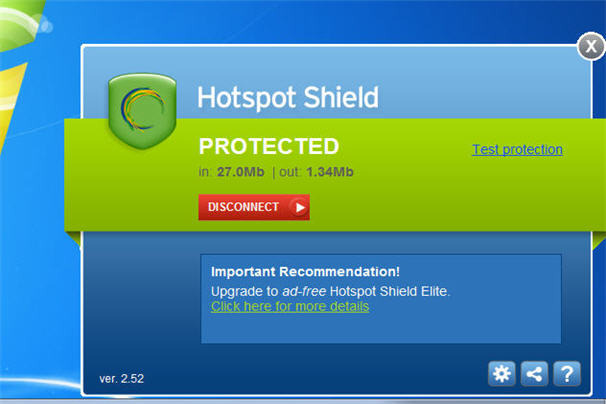
Others prefer Virtual Private Network (VPN) software that encrypts your online sessions. The browser-independent Hotspot Shield from AnchorFree, for example — available for Windows, Macs, iPhone and Android — channels all web activities through a personal VPN and secures all Internet communications by turning all HTTP traffic into the safer HTTPS (which is what your bank uses for a safe connection).
Free to use but with more features packed into the "elite" version ($29.95), Hotspot Shield is ideal for email and instant messaging, too, and reduces the likelihood of identity theft because you're not leaving a digital footprint -- including cyber-snoopers and rogue connections at Wi-Fi hotspots, hotels, airports, and so on.
Similarly, Tor is free software that defends you against Internet surveillance that threatens personal freedom and privacy. Short for "The Onion Router" — which gets its name for its "layered" approach to the encryption process -- Tor provides online anonymity as the software routes Internet traffic through a worldwide volunteer network of servers to conceal your location or online usage patterns.
USB sticks, too

In some cases, software to encrypt your connection is kept on a USB drive — therefore you can remain safe and secure even when using a public PC.
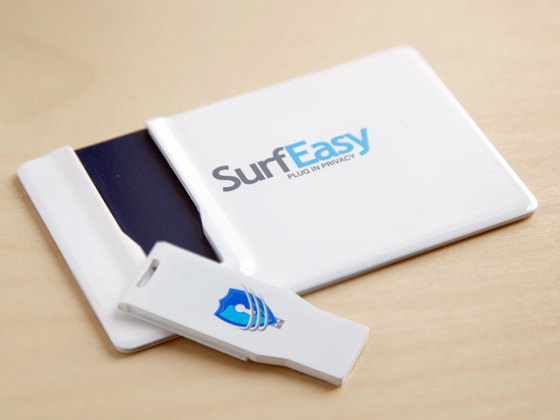
SurfEasy ($59.99) is a tiny USB key that fits into a credit card-shaped case to be kept in your wallet. When you plug it into a PC or Mac -- be it your own computer or a communal one -- it instantly launches its own password-protected browser and you're good to go -- no proxy or network settings to configure.
Your browsing session is handled through SurfEasy's fast and secure private proxy network. Your IP address will be masked throughout the session.
A free alternative is called Tails, which can be downloaded and installed onto a USB stick to run independently of the computer's original operating system.
Like SurfEasy, it lets you browse the web anonymously -- on virtually any computer — as all connections are channelled through the aforementioned Tor network.
Browser tweaks
Anonymous proxy software is a great way to mask your IP address online, but there is still plenty of information about your web surfing habits stored on your computer — which could also be viewed over a network, say, at the office, by your IT department.
At least it's somewhat easy to control your privacy settings directly in your web browser — unless your business forbids non-administrators from making changes to your browser settings, that is.

You can disable cookies — tiny text files stored on your computer with information about where you've been online, passwords and other info — and you should also delete your browser history to cover your tracks. All major web browsers — such as Internet Explorer, Firefox, Chrome or Safari -- allow you to delete your surfing history: simply go to the Options or Settings in your favorite browser and you'll see how to do this.
You might want to turn off auto-complete or someone on your computer could type in a few letters in a search engine or web address (URL) bar and any recent places you visited could fill in automatically. And don't click to allow sites to "remember my password" or someone could gain access to your private or financial information.
The easiest thing to do, however, is to see if your web browser has settings for surfing incognito — most of the major browsers do today. By enabling these privacy settings, your browser won't save any history (and download history), search queries, cookies or passwords.
Ona related note, Twitter recently announced a "Do Not Track" feature that prohibits the service from collecting info about its millions of users. Nice. And Microsoft, in June 2012, said its upcoming Internet Explorer 10 browser -- expected to launch alongside Windows 8 later this year -- will not collect data about the online activity of its users by default.
'Do not track' tools, plug-ins
Google raised a few eyebrows earlier in 2012 with its revamped privacy policy, which was updated to allow for the sharing of information between its various services such as Google Search, Gmail and YouTube. Therefore, if you search for recipes in Google Search you might be presented with cooking-related videos on YouTube. Handy? Sure. Invasion of privacy? Debatable.
You could choose not to log into your Google account when using these services (er, or not use them at all) or you might want to install one of the free browser plug-ins that tell Google and other advertisers to back off.
One called Do Not Track Plus from Abine blocks marketers, search providers and social networks from tracking your online activity — and it's compatible with all major web browsers. After it's installed, a small icon will appear to the right of the browser's address bar to tell you if a website wants to send data from your visit to other companies.

Speaking of requiring a login name and password on a variety of sites, some web-based services like Anonymizer can automatically generate temporary email addresses with unique usernames and passwords for any site you wish to access (excluding your bank or shopping sites, of course, or you can't access your account).
Similarly, another solution called BugMeNot lets users post free usernames and passwords for shared access to popular websites like video sharing sites and newspapers.