Tuesday, July 10, 2012

How Republicans plan to win over the youth vote


Four years after Barack Obama won the support of 66 percent of voters aged 18 to 29, Republicans are working on a fresh approach to bring younger voters and candidates into the fold, using a coalition of traditional campaign organizations, super PACs, nonprofit advocacy groups and policy-based think tanks.
And even Republicans organizing these efforts admit it's going to take some work.
Two groups, the Young Guns Action Fund and Maverick PAC—the latter was co-founded by George P. Bush, nephew of former President George W. Bush and son of former Florida Gov. Jeb Bush—will focus on finding young Republican political talent and supporting them with money. The two organizations announced a strategic partnership Tuesday that organizers hope will increase engagement with voters that were lost to Obama in 2008. One short-term goal, of course, is to narrow the enthusiasm gap between young Republicans and Democrats, but ultimately, they're looking far beyond the next election.
"The relationship is about developing something for the long-term that looks past just this November," YG Action Fund President John Murray told reporters during a breakfast meeting in Washington, D.C., on Tuesday. "By the midterms in 2014, perhaps we've made a little more progress; by the next presidential we've made some more progress, and [we've gained] ... the capacity to build that over time because it's going to take time."
Here's how the partnership will work: The YG Action fund, a super PAC, will scour the country looking for new young Republican House and Senate candidates. (The group is similar to, but independent from, the National Republican Congressional Committee's "Young Guns" program.) The Action fund will support these new GOP candidates and independently bolster their campaigns. Meanwhile, MavPAC will build its own base of young, new donors and fundraising bundlers, whom they plan to connect with the new recruits. The two groups will share data based on the information they gather from new supporters. They plan to spend $5 million this election cycle on the joint project.
YG Action Fund will recruit the pilots and cover the air war, while MavPAC rallies the boots on the ground.
Organizers say they hope to make some headway with younger voters this cycle, but they aren't promising a Republican revolution by November.
"We want to manage expectations," said MavPac co-founder Bush. "We don't want to say it's going to swing 180 degrees to the other side. I think it's worth the effort. I think to leave a complete demographic group like this uncontested is a mistake for the Republican Party."
To reach the goal, MavPAC and YG Action Fund leaders both pointed to Obama's success four years ago, and how he was able to "capture the imagination" of young people in his speeches. Now, they say, many of those same voters have graduated from college, are struggling to find work and are disappointed. Republicans plan to capitalize off that frustration.
"I am not here to say that there's some magic wand we're going to wave and all these voters are going to suddenly vote Republican," Murray said. "I think what we recognize is that there's a unique moment in time where there's a real choice being presented in this country, and many of these voters, once you articulate that voice, tend to say, 'You know, I want this freedom and opportunity, and I'm concerned about it.'"
MavPAC and YG Action aren't the only groups focused on shoring up the Republican base of young voters this cycle. American Crossroads, a group co-founded by Republican operatives Karl Rove and Ed Gillespie, announced the formation of Crossroads Generation earlier this year. In 2010, conservative operatives launched Generation Opportunity, which conducts nationwide voter registration drives targeting the younger set. Free from the restrictions of campaign finance laws, those independent groups will work to amplify the efforts of traditional party organizations.
Said YG Action Fund spokesman Brad Dayspring: "There's an opportunity to capture the imagination of those voters."

The Original Post Found Here..

25 (more) awesome iPhone tips and tricks


What's the only thing better than 25 ways to master your iPhone? 25 more.
In case you missed our first round-up of 25 assorted iPhone tips and tricks, be sure to read these simple ways you can get more out of your smartphone investment.
In the first post we covered everything from how to dry out a wet iPhone and fixing those dang "autocorrect" issues to using the phone cord to take a picture (and why) and making your own ringtone without having to pay your carrier.
And now we've got another 25 awesome things to try with your iPhone, many of which you weren't aware of.
And hey, if you have any tips of your own to share, be sure to leave them in the Comments section at the bottom — so you can get credit where it's due.
Here we go:
Turn iBooks into audio books: Like most smartphones, the iPhone has a number of accessibility options. One feature is called VoiceOver and it can read aloud any text on the screen. While designed primarily for the seeing impaired, anyone can take advantage of this feature if they want to turn an e-book into an audiobook. Now you can listen while commuting to and from work, while closing your eyes in bed or when jogging down the street. To activate it, go to Settings, then General, followed by Accessibility. Finally, swipe to change VoiceOver from Off to On. You'll also be able to tweak settings, such as the speed of voice reading to you. She sounds like the voice of Siri, by the way.
Quick access a draft email: You probably know you can start an email and save it as a draft to finish or review at a later time -- if not, when you're typing an email, tap Cancel and then select Save Draft — but here's a super quick way to access your message draft when you're ready to continue working on it: Open up the Mail app, touch and hold the Compose button (the icon of the small pencil in the square) and after a second or two it'll automatically take you to your last saved message draft. Neat, huh? Otherwise, you need to open Mail, select the email account, select Drafts and then find the message.
Send multiple photos at the same time: To send multiple photos to the same contact (say, in an email or iMessage), open the Photos app and then tap on an album, such as Camera Roll. Now tap the Select icon in the top right of your iPhone screen. Now you can tap to choose any photo you'd like to send to someone. Once you've selected the desired pics, tap Share in the bottom right of the screen and you'll have three options: Email, Message or Print.
Tell Siri the entire email: iPhone 4S owners probably go through a lengthy back-and-forth with Siri just to compose an email. Most people say the person's name and then, when prompted, the subject line, and finally, the body of the email. But did you know you can do it all in one fell swoop? For example, hold down the home button and say "Remind my wife about the party and say don't forget to pick up a bottle of red wine tonight." Siri will know who your spouse is (or will ask you once) and place that in the To: field, and because you said "about" the party, Siri knows you want that in the Subject (Re:) field. You also said "and say," which places words you said after that into the body of the email. This will all save you time.
Close open apps to save battery life: Make sure apps you're no longer using are not open and draining the battery. Do this by double-tapping the Home button and you'll see all the recently used apps running in the background along the bottom of your phone -- such as a GPS app you no longer need because you've reached your destination. Press and hold an icon and they'll all jiggle, which means you can tap the X to close the open apps at the bottom of your iPhone.
Tweet from any app: If you scour comments and message boards on the web you'll find iPhone users who complain the integrated Twitter support isn't working for them. Chances are it's because they didn't know they had to sign in first — but it's only required once. Go to Settings on your iPhone, select Twitter (look for the little white bird on a blue background) and enter your Twitter handle (or email) and password. Now, you can tweet directly from apps like Safari, Photos, Camera, Maps and YouTube. Also remember that you can start typing a friend's Twitter handle and the iPhone will autocomplete the rest.
Undo the Bluetooth "ignore" command: If you've ever paired Bluetooth products with your iPhone then you're likely aware you can also choose to "Ignore This Device." There are different reasons why you'd want to do this, but sometimes you tap this option accidentally or you might change your mind after the fact. Now you won't see the wireless gadget you want to pair with. What to do? To have it show up on the list again, simply turn off your iPhone by pressing and holding the power button (on top of the phone) for a few seconds and then swipe to shut down. When you boot back up again you'll see the Bluetooth device you previously ignored.
Siri can handle Facebook, Twitter: The iO6 update will add native Facebook and Twitter support this fall, but until then, you can still use your voice to tweet or update your status. It involves setting up these popular social networking services to work with text messaging. For Facebook, text the word "hello" to 32665 (which spells FBOOK on a traditional keypad). You'll get an automated reply on your phone with a link to click to finish the setup. Finally, add the short code to your address book and rename it "Facebook." Now you can tell Siri "Text Facebook," followed by your status update. It's the same process for Twitter, as you'll want to enable mobile updates by sending a short code to Twitter. Then you'll add the short code to your Contacts, name it "Twitter" and then instruct Siri to send a message there. To get going, text the word "start" to 40404 (U.S.) or 21212 (Canada).
Lock the screen orientation: Does it drive you nuts to have the iPhone screen flip around when you rotate the phone? You can prevent this from happening if you have no desire to swap between portrait and landscape view. Simply choose the orientation you prefer by tilting the device and then double-click the Home button. This will bring up the multitasking interface at the bottom of the iPhone. Now swipe from left to right and you'll see a "portrait orientation lock" icon at the very left of this string of apps (it has a circular arrow on the icon). Tap it once to lock your orientation and you'll see a padlock appear. Turn it off by tapping it again.
Add PDFs to iBooks: You don't need to spend money on apps that let you read Adobe PDF (Portable Document Format) files. Instead, if you get a PDF as an attachment in an email, or see one on a website in Safari (or another iPhone browser), simply press and hold the PDF icon or link and you'll see an option appear called "Open in iBooks." Select this and you'll be able to read the PDF in the iBooks app. In fact, all your PDFs will now be stored here. Simply tap the word Books in the iBooks app (top, center of screen) and now select PDFs to see them all on the virtual bookshelf. You can delete them from this screen, too, if desired.
Master the keyboard: In the first 25 Awesome iPhone Tricks post we cover how to add your own shortcuts and quickly accept or refuse autocorrect suggestions. But here's a few other keyboard related tips: tap the space bar twice and the iPhone will add a period and capitalize the next word; quickly capitalize a word by pressing on the Shift (arrow) button and dragging your finger to the first letter of the word; to enter a number or symbol quickly, touch and hold, then select the key you want (lifting your finger returns you to the alphabet keyboard); and touch and hold a letter to reveal a list of special characters, such as à, á, â, ä, æ, ã and å, when you press and hold on "a." Hey, now you can type "Mötley Crüe" properly.
Siri is a verbal calculator, too: You might know Siri on iPhone 4S can give you facts and definitions on-demand but "she" can also solve math problems for you, too (this is where students, off for the summer say "so NOW you tell me"). Just give Siri a verbal task, be it addition, subtraction, multiplication, division, equations or fractions — and you'll see (not her) the answer on the screen. Better yet, this is very handy when figuring out tip at a restaurant. For example, say you're out with three friends and the bill comes to $300. You can ask Siri something like "What's a 20 percent tip on $300, for four people?" and Siri will tell you everyone owes $15.
Swipe to delete messages: This one is pretty simple, but you'd be surprised how many people do it the longer way: to delete an unwanted email, text message or voicemail without opening them, just swipe across the message from right to left when you see it in list view and tap the red Delete button. Instead, many iPhone users waste time by opening up each and every message and tapping the small trash can at the bottom of the screen. On a related note, you can delete unwanted emails in bulk rather than deleting one at a time: In your Inbox, simply click the Edit button and check off the emails you want to delete with your finger and then choose Delete.
Tap to focus the camera: Those who regularly use the iPhone as a camera might know this simple trick: When you're snapping photos or shooting video on your iPhone — and seeing the subject on your screen as you line up the shot -- tap the screen where you want to iPhone to focus and it'll adjust the exposure and white balance automatically for that area. For example, you might want your friend's face in perfect focus or might opt for a more artsy shot of the sushi they're holding in their chopsticks by focusing the camera on the food. You get the idea.
Manage your camera time: Here's another tip when using the camera. Unless you're running out of room, never delete unwanted photos from your iPhone when you're out. Why? You really don't know what the photo looks like until you see it much bigger on a computer monitor (it may be better than you think and/or fixable with software). Plus, spending time deleting photos on your smartphone right after you took them means you might miss an awesome shot because you're not paying attention. And finally, deleting photos and videos off your iPhone unnecessarily drains the battery.
Add folders to the dock: Since iOS 4, you've been able to create a folder to store many similar apps on your home screen — this helps you better group your programs and find them easier. (Just press and hold an app until they squiggle, then drag and drop it onto another app). But did you know you could also create folders and add them to your dock at the bottom of the iPhone? Once you've got your folders created — and you can create or edit the name for the folder by pressing and holding the icon — simply drag it to the bottom of the iPhone screen for easy access. You can only have four icons at a time, so you might gave to move one there to your homescreen to make room.
Hold your iPhone like a camera: If you don`t like take a photo on your iPhone by pressing the virtual shutter button on the screen — after all, it's not the most comfortable and could cause the iPhone to shake when you snap the picture — then remember you can now take a photo by pressing the volume button on the side of your iPhone, which will be on top — in the same place as a shutter button on a regular camera!
Preview that picture: On a related note, if you want to preview the photo you just took, just drag your finger from left to right in the Camera app for a preview. Most people will tap the icon in the lower-left of the screen and open up the photos manually. If you haven't taken any photos or videos lately, swipe from left to right in the Camera app will start to show your Camera Roll, from newest to oldest, as you continue to swipe along.
Easily control your music: When you're listening to music on your iPhone and using the earbuds that shipped with them, you might be aware you can press once on the small controller in the middle of the headphone cord to pause the music, and press again to play. But did you know you could quickly double tap to skip to the next song and triple-tap to listen to the previous song? Also, iPhone 4S users can use Siri to play music, such as saying "Play Jay Z" or "Play other music like this" or "Play playlist workout mix."
Quickly add a calendar entry: You might've noticed when reading an email in the Mail app it'll automatically underline anything related to date and time. For example, you're typing to your buddy something like "Don't forget we're hooking up for drinks on Friday afternoon." iPhone will detect this is a date or time and will convert it to a link -- your friend will see "on Friday afternoon" underlined and in blue — and they could tap the link to add the event to their calendar.
Sync it all: Computer? What computer? You need not connect your iPhone to your PC or Mac every again if you activate the iCloud service. Automatically back-up your iPhone information to iCloud by going to Settings, iCloud and finally Storage and Back-Up. Also, be sure to select what gets synched over Wi-Fi (or if you prefer, 3G, too, though be aware of data costs). You can choose to sync Mail, Contacts, Calendars, Reminders, Bookmarks, Notes, Photos and more. You get 5GB of free storage through iCloud, but can pay for more if you like. Also, while here, activate "Find My iPhone" so you can track your phone if missing or stolen (see here).
Enable restrictions: Whether it's on your iPhone or your child's iPod touch or iPad, you can block inappropriate content from your kids (such as music with explicit lyrics), prevent them from buying apps (or in-app purchases) and block YouTube, Safari, FaceTime and more. To enable restrictions — and then customize what they're able to access -- go to Settings, General, Restrictions and tap "Enable Restrictions." You will first be promoted to select a 4-digit passcode before choosing which content and apps can be accessed.
Delete your memory-hogging apps: Beginning with the iOS 5 update, you can see how much space your apps are taking up on your iPhone and delete them from your device — even a bunch at once. To do this, tap Settings, followed by General and finally, Usage. From here you'll see a list of all your apps and their file size. If you see that Max Payne game is 1.3 Gigabytes and you don't play it anymore, tap to delete it. You can always reinstall it later of via iCloud, App Store or your computer.
Save battery by turning off "pushed" data: Another way to prolong battery performance is to off push notifications in email, instant messaging and other applications that constantly ping a server to push real-time notifications to your smartphone. That is, if you don't need to know this kind of information right away. In Settings, select the option that says Mail, Contacts and Calendars, tap "Fetch New Data" and change it from Push to Every 30 Minutes, Hourly or Manually.
Turn on the "Emoji" (emotions) keyboard: Ever notice how some of your friends have cute little emoticons in their emails or text messages. You know, like a little yellow face with hearts for eyes, teddy bears, Christmas trees, and so on? By default, your iPhone doesn't give you access to these emotions and other graphics — but it is stored on your phone and ready when you are. To enable the Emoji keyboard, go to Settings, then General and finally Keyboard. Once inside, tap International Keyboards and "add" new keyboard. Select "Emoji." Now, when typing an email or text, tap the globe key near the space bar for these new options. Tap it again to return back to English.

The Original Post Found Here..
 

Wednesday, July 4, 2012

The Amazing Spider-Man (2012)


Peter Parker finds a clue that might help him understand why his parents disappeared when he was young. His path puts him on a collision course with Dr. Curt Connors, his father's former partner. 

Storyline

Like most teenagers, Peter is trying to figure out who he is and how he got to be the person he is today. Peter is also finding his way with his first high school crush, Gwen Stacy, and together, they struggle with love, commitment, and secrets. As Peter discovers a mysterious briefcase that belonged to his father, he begins a quest to understand his parents' disappearance - leading him directly to Oscorp and the lab of Dr Curt Connors, his father's former partner. As Spider-Man is set on a collision course with Connors' alter-ego, The Lizard, Peter will make life-altering choices to use his powers and shape his destiny to become a hero.


The untold story? Not quite, but a well-told story? Definitely.


After Spider-Man 3 became something of a critical and commercial letdown and plans for a sequel fell through, the folks at Marvel Entertainment and Columbia Pictures developed a case of itchy reboot button syndrome and immediately put The Amazing Spider-Man into production to swing in and save the franchise. Many fans rolled their collective eyes and the web was abuzz with fiery opinions. Early looks and promotional materials seemed generally underwhelming, and the film quickly became buried by bigger releases such as The Avengers, The Dark Knight Rises and Prometheus. However, this spider has become something of a dark horse and has somehow risen to greet detractors with a shot of webbing to the face.

In spite of the poor first impressions, one would be hard-pressed not to admit that The Amazing Spider-Man is actually a competently-made, enjoyable flick. The approach that the aptly-named director Marc Webb of (500) Days of Summer fame took brings to mind last year's surprise hit Marvel flick X-Men: First Class, in that in combines the youthful appeal of teen drama with relatively large-scale super heroics and action sequences. This film does not repeat the mistakes of Spider-Man 3 – instead, we have character development and interaction and clear and easy-to-follow plot progression.

Spider-Man has always been a hero all readers could relate to, with his transition from outcast to hero and his various personal, real-world struggles. Andrew Garfield, sexy nerd incarnate, is an ace casting choice. The actor has said that playing Spider-Man has been his dream since he was a young boy and the role went to the right guy. Garfield has an effortless, genuine charm and his slightly lanky proportions do seem very reminiscent of the Peter Parker of the comics, particularly the Ultimate version. For all the strengths of Tobey Maguire's interpretation of the character, Garfield's somehow rings more true. Whether he's being a smart-mouthed do-gooder, a teen sorting out his issues with his well-meaning aunt and uncle or a young lover unsure of how to go about a relationship with his dream gal, Garfield is in great form.

Speaking of his dream gal, Emma Stone does a similarly good job of playing Gwen Stacy. Many were confused after Stone was cast and then announced as playing a different character from Kirsten Dunst's. Gwen did pop in Spider-Man 3 played by Bryce Dallas-Howard, and is touted as Parker's first love. In an interview, Stone states that "Mary Jane fell in love with Spider-Man, but Gwen Stacy fell in love with Peter Parker". Gwen is smart, kind and funny, surely what every guy looks for in a girl, and her role in the story is just the right size. Sure enough, the chemistry between Stone and Garfield is among the strongest of on screen couples in recent memory and it's no surprise that the couple continued their romance off the set.

One has to feel bad for Dylan Baker who portrayed Dr Curt Connors in Spider-Man 2 and 3 but never got the chance to transform into the Lizard after the cancellation of a fourth entry in Raimi's series. Rhys Ifans fills those shoes, and he marshals a tragic figure who hopes to better society and to fix his own perceived physical flaw. This definitely will push the excellent actor further into public consciousness, and he does a decent job. However, Connors' split-second snap from rational scientist to raving mad supervillain does seem a tad rushed and the design of the Lizard, as has been stated before, is pretty goofy. Also, the relationship between Connors and Parker, while given some attention here, could have benefited from a little mo re.

The rest of the supporting cast is good too. Martin Sheen is easy to buy as the earnest, down-to-earth uncle and father figure who serves as an upstanding role model to his nephew, and so is Sally Field as his concerned, protective wife May. Casting these veteran film industry stalwarts was certainly a good move, especially since this retelling doesn't particularly focus on the two but does convey their involvement in Peter's life. Denis Leary is also well-cast as the Inspector Javert-type Captain Stacy, who could have been an over-the-top, "squash Spider-Man dead!" figure. Instead, Leary makes him a stern but well-meaning authority figure and gives him a good dynamic with his daughter and Peter. His resemblance to Willem Dafoe, aka Green Goblin from the first Spider-Man film, is a little distracting though.

In terms of aesthetics, the movie looks sleek and dramatic – director Webb uses his ample experience shooting music videos in the right way. While it could have been something like the horrid Catwoman movie, there is instead clever use of lighting and composition and the action sequences are kinetic yet coherently-shot. This reviewer isn't a giant fan of the costume, produced by the people at Cirque du Soleil (really) and the afore-mentioned facial features of the Lizard. The large amounts of digital effects supplied mostly by Sony Pictures Imageworks (also responsible for last year's Green Lantern film) are also a cut or so below expectations for a big-budget superhero movie, but these don't significantly hurt the end result.

The film brings up the issue of Peter's parents but never fully addresses it, with a slightly ham-fisted mid-credits sequel hook hinting at what is to come. The Amazing Spider-Man has been marketed as "the untold story", which is rather bold given that it's only been ten years since Sam Raimi's Spider-Man and five years since Spider-Man 3. Still, it defies expectations and is thoroughly entertaining. Untold story? Not quite, but well-told story? Definitely.

How to browse the web anonymously

Think your online activities are private? Think again.
Not only are your surfing sessions tracked by websites, search engines and social networks, but often your Internet service provider (ISP), web browser, government and potentially hundreds of online tracking companies.
Whether it's to collect valuable (read: sellable) marketing data or prevent terrorist activity, movie piracy or kiddie porn, everything you think you're doing privately in the comfort of your home is anything but private.
But just because you want to spend time online anonymously doesn't mean you're a cybercriminal or have something to hide. Not only do regular folks want privacy, but remaining anonymous can also protect yourself from malicious types out to steal your identity for financial gain — from spammers and scammers alike.
And so there are a few things you can do to reduce the odds every click is tracked, archived and shared. The following are a few suggestions on where to start.
Smart software
How does Facebook know to show you ads for your local gym, supermarket or college? This is because your computer's unique Internet Protocol (IP) address, assigned by your ISP, reveals your geographical whereabouts. Even if your computer generates a different IP address every time you boot up or log online, this number (e.g. 220.165.119.12) can still tell of your general location.
And so there are many different solutions that can hide your Internet connection, allowing you to remain anonymous while online.
Some are websites, such as free "online proxy servers" that conceal your identity — simply point the web address (URL) to the proxy server and surf right from their website (check out proxy.org for a list of great options).

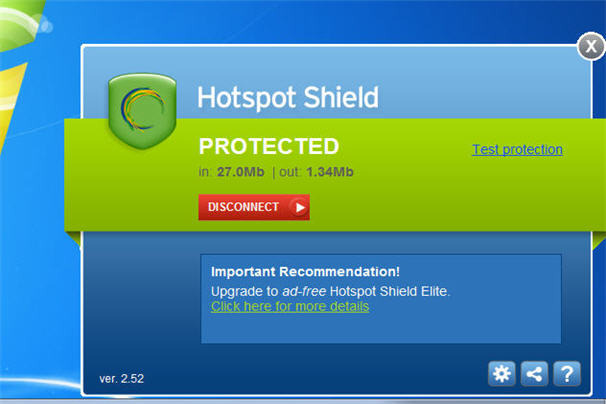
Others prefer Virtual Private Network (VPN) software that encrypts your online sessions. The browser-independent Hotspot Shield from AnchorFree, for example — available for Windows, Macs, iPhone and Android — channels all web activities through a personal VPN and secures all Internet communications by turning all HTTP traffic into the safer HTTPS (which is what your bank uses for a safe connection).
Free to use but with more features packed into the "elite" version ($29.95), Hotspot Shield is ideal for email and instant messaging, too, and reduces the likelihood of identity theft because you're not leaving a digital footprint -- including cyber-snoopers and rogue connections at Wi-Fi hotspots, hotels, airports, and so on.
Similarly, Tor is free software that defends you against Internet surveillance that threatens personal freedom and privacy. Short for "The Onion Router" — which gets its name for its "layered" approach to the encryption process -- Tor provides online anonymity as the software routes Internet traffic through a worldwide volunteer network of servers to conceal your location or online usage patterns.
USB sticks, too

In some cases, software to encrypt your connection is kept on a USB drive — therefore you can remain safe and secure even when using a public PC.
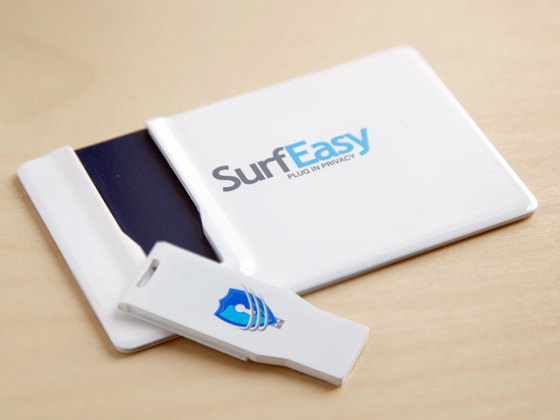
SurfEasy ($59.99) is a tiny USB key that fits into a credit card-shaped case to be kept in your wallet. When you plug it into a PC or Mac -- be it your own computer or a communal one -- it instantly launches its own password-protected browser and you're good to go -- no proxy or network settings to configure.
Your browsing session is handled through SurfEasy's fast and secure private proxy network. Your IP address will be masked throughout the session.
A free alternative is called Tails, which can be downloaded and installed onto a USB stick to run independently of the computer's original operating system.
Like SurfEasy, it lets you browse the web anonymously -- on virtually any computer — as all connections are channelled through the aforementioned Tor network.
Browser tweaks
Anonymous proxy software is a great way to mask your IP address online, but there is still plenty of information about your web surfing habits stored on your computer — which could also be viewed over a network, say, at the office, by your IT department.
At least it's somewhat easy to control your privacy settings directly in your web browser — unless your business forbids non-administrators from making changes to your browser settings, that is.

You can disable cookies — tiny text files stored on your computer with information about where you've been online, passwords and other info — and you should also delete your browser history to cover your tracks. All major web browsers — such as Internet Explorer, Firefox, Chrome or Safari -- allow you to delete your surfing history: simply go to the Options or Settings in your favorite browser and you'll see how to do this.
You might want to turn off auto-complete or someone on your computer could type in a few letters in a search engine or web address (URL) bar and any recent places you visited could fill in automatically. And don't click to allow sites to "remember my password" or someone could gain access to your private or financial information.
The easiest thing to do, however, is to see if your web browser has settings for surfing incognito — most of the major browsers do today. By enabling these privacy settings, your browser won't save any history (and download history), search queries, cookies or passwords.
Ona related note, Twitter recently announced a "Do Not Track" feature that prohibits the service from collecting info about its millions of users. Nice. And Microsoft, in June 2012, said its upcoming Internet Explorer 10 browser -- expected to launch alongside Windows 8 later this year -- will not collect data about the online activity of its users by default.
'Do not track' tools, plug-ins
Google raised a few eyebrows earlier in 2012 with its revamped privacy policy, which was updated to allow for the sharing of information between its various services such as Google Search, Gmail and YouTube. Therefore, if you search for recipes in Google Search you might be presented with cooking-related videos on YouTube. Handy? Sure. Invasion of privacy? Debatable.
You could choose not to log into your Google account when using these services (er, or not use them at all) or you might want to install one of the free browser plug-ins that tell Google and other advertisers to back off.
One called Do Not Track Plus from Abine blocks marketers, search providers and social networks from tracking your online activity — and it's compatible with all major web browsers. After it's installed, a small icon will appear to the right of the browser's address bar to tell you if a website wants to send data from your visit to other companies.

Speaking of requiring a login name and password on a variety of sites, some web-based services like Anonymizer can automatically generate temporary email addresses with unique usernames and passwords for any site you wish to access (excluding your bank or shopping sites, of course, or you can't access your account).
Similarly, another solution called BugMeNot lets users post free usernames and passwords for shared access to popular websites like video sharing sites and newspapers.

This 4th of July: The dawn of a new 'independents' day

A record-high 38 percent of Americans now describe themselves as independents. Republican and Democratic party leaders ignore this growing lack of party allegiance at their peril. Whichever party shifts to accommodate more moderate voters first will survive and even thrive.

This July 4th, as Americans celebrate Independence Day, a different type of independence is growing in size and influence – political independents, those voters who choose not to align with either major party.
A recent Pew Research Center poll captured headlines with its report that the divide between Democrats and Republicans is widening into a significant gulf. That's indeed noteworthy, but the data reveal an equally important political development that risks getting overlooked. A record-high 38 percent of Americans now describe themselves as independents.
That's more than those who align with Democrats (about a third) or Republicans (about a quarter). The shift is most striking among younger generations – 45 percent of Millennials and 42 percent of Generation Xers.
What might this rise foretell?
Although the numbers suggest there is political space for a third party to succeed, the American political system provides strong incentives for voters and political elites to align with two, and only two, parties.
Most elections in the United States allow only one winner, and whoever receives the most votes wins. If many parties competed for a single seat, a person could win office with 20 percent, 15 percent, or even fewer votes, leaving almost everyone dissatisfied.
At the presidential level, if more than two candidates seriously contend the general election, the chance of anyone winning a majority in the Electoral College narrows. And strong third-party candidates are often considered "spoilers." Many Democrats still grumble over Ralph Nader "stealing" the 2000 election from Al Gore, while many Republicans complain about Ross Perot helping Bill Clinton in 1992.
In this primary season, the grass-roots group Americans Elect attempted to make a way for a nonpartisan presidential candidate. It failed miserably. No candidate earned enough support to cross the threshold to nomination.
What are the options for independent candidates, if not a third party? Our system is stacked against them, too. Ballot-access requirements, major fundraising networks, and winner-take-all elections offer significant advantages to candidates with party backing. Primaries in most states exclude independent voters or force them to choose sides.
Independent and third-party candidates made it onto the ballot in only 18 percent of state contests between 2000 and 2009, winning about 2 percent of the races they entered.
Independents are most likely to succeed when they are tied to a party (like Sen. Joe Lieberman, the career-Democrat who won reelection as an independent after losing a primary) or are in idiosyncratic political places like Maine and Vermont. Independent US Senate candidate Angus King is capturing media attention and may very well win his senatorial bid in Maine; but his candidacy is an outlier, not the bellwether.
Both parties need independent voters to win. But have the parties forgotten this?
Campaign strategists have a simple recipe for success. They divide voters into three camps: ours, theirs, and up-for-grabs. Winning campaigns pay just enough attention to their committed voters to keep them happy and get them out to vote; they avoid voters who are solidly in the opponent's camp, and they focus most of their efforts on those most likely to be persuaded – like political independents.
When forced to choose between parties, most independents will pick a side. But the lack of willingness to align with a party suggests the parties have an image problem.
Consider this trend: Independents have surged and the parties have grown more polarized, yet underlying ideological views have changed little. In Pew Survey polls from 2000 to 2012, between 35 and 36 percent said they were conservative; about the same amount said they were moderate; and 18 to 22 percent said they were liberals.
The biggest defections appear to be from the Republican Party, as the recent rise in numbers of independents over the past decade has come almost entirely from conservatives and moderates (including some Democrat moderates).
Parties are not particularly popular, even in their own ranks. A majority of Democrats and those who lean Democratic say their party is doing only a fair or poor job of standing up for its traditional positions. Republicans and those leaning Republican are even more dissatisfied.
The growing lack of party allegiance and the high levels of dissatisfaction are trends that current party leaders ignore at their peril.
One need only look at the changing control of Congress over recent elections to see what happens when voters grow dissatisfied. In 2006, voters threw out Republicans; in 2010 they gave House Democrats the boot. Voter anger could flip control again.
Republican and Democratic party elites should be running scared. Polling data suggest and history confirms that American voters prefer broad-based parties that govern from the ideological middle, not from the extremes.
Whichever political party does the math first and shifts to accommodate more moderate voters will be well positioned to survive and even thrive in coming decades.
Amy E. Black is associate professor of political science and chair of the department of politics and international relations at Wheaton College in Wheaton, Ill.

Original Post Found Here..

Tuesday, July 3, 2012

A Jobs Boom Built on Sweat in an Age of Belt-Tightening

Want to know what the job of the future looks like? Go to the gym.
Phillip Hoskins did, but not to work out. He went to find clients, and to join the ranks of personal trainers, one of the fastest-growing American occupations.
“I knew I didn’t want a desk job,” said Mr. Hoskins, of Louisville, Ky., who became a personal trainer after being let go, after 17 years, from a middle-management position at a car repair shop in December. “I’m pretty fit for 51 years old, and I knew I could do something with that.”
Once stereotyped as the domain of bodybuilders and gym devotees, personal training is drawing the educated and uneducated; the young and old; men and women; the newly graduated, the recently laid-off and the long retired.
From 2001 to 2011, the number of personal trainers grew by 44 percent, to 231,500, while the overall number of workers fell by 1 percent, according to the Labor Department.
It is no wonder that so many Americans are trying to transform a passion for fitness into a new career.

[Related: Fitness Rules You Should Break]
Personal training requires many of the skills and qualities of the new typical middle-class American job: it is a personal service that cannot be automated or sent offshore, that caters to a wealthier client base and that is increasingly subsidized (in this case, by employers and insurance companies).
But as people with such jobs have found, the pay is low. Unlike the clock-in-and-clock-out middle-class jobs of the past, personal service occupations have erratic hours, require entrepreneurial acumen and offer little job security.
“The kind of job where you come in and work 9 to 5, and where someone tells you what to do all day is becoming scarcer and scarcer,” said Erik Brynjolfsson, an economics professor at M.I.T. and co-author of “Race Against the Machine,” a book about how automation is changing the job market. “The kind of job where you have to hustle and hustle and where you’re not sure whether you will have enough clients next month, where you have less job security, is becoming much more common.”
For personal trainers, the median hourly wage is less than $15. Because they have to find clients and set up their businesses, trainers must be flexible, adapting to client schedules and physical abilities, as well as the availability of exercise machines and accommodating weather.
They must also be able to engage with all sorts of personalities — precisely the skills that help keep these jobs around while others are replaced by algorithms.
“Knowing how to keep someone motivated and how to keep a connection are skills humans have learned and evolved over hundreds of thousands of years,” Professor Brynjolfsson said. “A robot can’t figure out whether you can do one more push-up, or how to motivate you to actually do it.”
Donna Martin, 69, of Orlando, Fla., recently became a personal trainer after having been retired for 25 years. She mostly works with clients over age 60. “I think my age actually helps me get clients,” she said.
Another reason for the surge in personal trainers — as well as home health aides and other midskill service occupations — is that the barriers to entry are low.
The industry is mostly unregulated, with private organizations rather than governments issuing certifications. Once upon a time, some certification organizations required bachelor’s degrees and intensive study; now dozens of groups offer ever cheaper and easier certifications to serve the fitness boom.

[Related: 'Useless' Degree, Awesome Job]
The fitness industry has been growing steadily in good economies and bad, with American health clubs adding about 10 million members since the recession officially began in 2007, according to the International Health, Racquet & Sportsclub Association.
Facing a sea of options, Mr. Hoskins chose an online test that cost $60 by Action, an organization founded in 2008. Action is not accredited by the National Commission for Certifying Agencies, the group the industry uses to vet such certifications, though, and he could not find a local gym that recognized the credential.
He is now studying for a more in-depth test from an older group, the American Council on Exercise, and trying to train clients on his own until he can qualify to work for a gym. The study materials and test cost about $500.
Some older certifying organizations favor more regulation because they see the industry maturing and fear that increasing numbers of new trainers with less experience will dilute the reputation of trainers in general.
“We are really trying to professionalize this industry, and state-by-state licensure may be what we need,” said Mike Clark, the chief executive of the National Academy of Sports Medicine and a licensed physical therapist. “Right now, the gyms really don’t want that, though, because they’re already having trouble finding enough trainers with just the current system.”
In a country with a 35.7 percent obesity rate, potential customers are plentiful, at least in theory.
But personal training, like other personal services, is increasingly freelance. Most trainers drum up their own business. It does not help that trainers must persuade strangers to pay to do something they probably do not like to do: exercise.
“I’ve got a Web site, a blog, a Twitter account, a Facebook feed, an e-mail blast, basically any kind of social media I can find to get the word out there,” said Mark Spurbeck, 28, of Eagan, Minn., a college graduate with a degree in English and history. He got his certification in May but is still primarily working as a Web site designer.
“I’ve been telling my friends: ‘Let’s work out for free. Don’t worry about paying me. My only fee is telling your other friends to hire me,’ ” he said.
So far he has two paying clients, whom he trains at their homes.
Mr. Spurbeck has considered working at a gym, where possible clients would at least all be in one place. But his local gyms, he said, generally take a 50 percent commission on all sessions, and would require him to be there eight hours a day regardless of whether he had clients booked.

[Related: Jobs with high lifetime earnings]
That is because many gyms use trainers as recruiters for their own clients, even though knowing how to do the perfect pull-up does not necessarily translate into good salesmanship.
“A lot of people have the passion for the training and helping people, but then they get in that environment and then they just don’t know how to sell themselves to clients,” Mr. Spurbeck said. “I know a lot of trainers who are doing more sales than actually training.”
The incentive structure at gyms has evolved to further prioritize salesmanship over formal credentials.
“Back 10 years ago, pay was based purely on education,” said David Van Daff, the vice president for membership at the National Academy of Sports Medicine, who said he had hired more than 12,000 trainers as a manager at Bally Total Fitness, a national gym chain. “The structure has changed at a lot of gyms, where now it’s based more on productivity — how many hours you’ve already booked.”
As for Mr. Hoskins, he continues trying to find clients while he studies for certification.
“I’ve been talking to people through my church mostly,” he said. “It’s going to have to be word of mouth at this point. All that’s up to me is I have to perform when I do find them.”

Original Post Found Here..

No crime in Bradley's win over Pacquiao, Nevada rules without interviewing judges

LAS VEGAS – Many believe that Timothy Bradley's victory over Manny Pacquiao in their June 9 bout for the World Boxing Organization welterweight title was a robbery, but the Nevada attorney general said Tuesday it was not a crime.
Catherine Cortez Masto, the Nevada attorney general, wrote in a letter to Top Rank's Bob Arum that "there do not appear to be any facts or evidence to indicate that a criminal violation occurred."
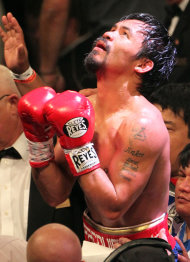
Manny Pacquiao reacts after losing to Timothy Bradley Jr. (Getty)
That pleased Bradley manager Cameron Dunkin, who said, "I'm not surprised at all." However, it did little to soothe the feelings of Arum, who in the immediate aftermath of the majority decision favoring Bradley was blamed by the public for somehow influencing the result.
Arum said he didn't think the inquiry, conducted by Dale Liebherr, the attorney general's chief of investigations, was thorough enough. He sent a letter to Cortez Masto on June 11 requesting the result be investigated to clear his name and with the hope it would restore public confidence in boxing.
Not interviewing judges Jerry Roth, C.J. Ross and Duane Ford was a mistake, Arum said.
"I have no reaction to it," Arum said. "They spent a lot of time interviewing the referee [Robert Byrd] who had nothing to do with judging the fight, and I didn't see any interviews with the three judges who scored it? Wouldn't you do that if you were looking into it?"
[Related: See letter from promoter Bob Arum requesting a formal investigation (PDF)]
Ross and Ford each scored the bout 115-113 in favor of Bradley, while Roth had it 115-113 for Pacquiao. The overwhelming consensus of fans and media who saw the fight was that Pacquiao won handily.
Cortez Masto wrote that the judges were experienced and had the qualifications to officiate a match of the magnitude of Pacquiao-Bradley. She noted that all procedures were followed in selecting the officials.
"Displeasure with the subjective decisions of sporting officials is not a sufficient basis for this office to initiate a criminal investigation," Cortez Masto wrote. "Unless evidence beyond mere displeasure if forthcoming, this matter will be considered closed. While there may be strong disagreement with the decision, the exercise of professional judgment by individuals officiating at a sporting event is not by itself a criminal violation."

[Related: Nevada Attorney General's response to Bob Arum (PDF)]
Arum, though, said Liebherr could not have determined whether or not a crime was committed if he did not interview the judges who scored the fight. He was happy that Cortez Masto wrote that there was no evidence of criminal wrongdoing, but was unhappy it wasn't a more definitive answer.
"Anybody who reads that letter is going to say, 'Hey wait a second. The three people who, in effect, caused this, why weren't they interviewed?' Obviously, it would have been far more thorough had they interviewed the judges. They probably would have come to the same conclusion [that there was no evidence of a crime], but at least they would have talked to the people at the center of the issue."
Dunkin said he hoped the letter would make life easier for Bradley, who has been subjected to abuse by angry fans.
"Nothing did happen, no funny business at all, and I'm not surprised that's what [Cortez Masto] found," Dunkin said. "I expected this. I'm happy they cleared it up, and for all the paranoid people who don't understand and who don't know what they're talking about, now they can calm down."

Original Post Found Here..

Justin Bieber Finds Breaking Point, Hangs Up On Morning Radio Show

Justin Bieber is usually a pretty laid-back guy--for a superstar, anyway. In just the past few weeks, he's cheerfully endured such public tests as David Letterman dissing his tattoos, as well as a dare to put on an English accent for the duration of an entire British interview.
However, he does seem to have a breaking point--and a Detroit-area morning radio show managed to find it, when he recently called in to chat.Justin Bieber
Things started off fine and well, until the host of the Mojo In The Morning show decided to compare Bieber to another well-known pop singer.
"I hope you take this as a compliment," said Mojo. "When I heard 'Boyfriend' for the very first time, I thought it was Justin Timberlake's single."
"Saying I sound like someone else is not really a compliment," Bieber retorted.
That wasn't the only thing that got his goat. Mojo went on to ask about the singer's friendship with teen heartthrob band One Direction, and that led to the straw that broke the Biebs' back.
After Bieber noted that the One Direction lads were "good kids," the host blasted him with the following question: "Do you worry about Harry around your mom, since he likes older women?" (One Direction's Harry Styles has reportedly dated several women in their 30s.)
"Do I wonder...what?" answered a confounded-sounding Bieber.
After the question was repeated, Bieber snapped back in a chilly tone, "I think you should worry about me around your mom, bro."


"Justin, my mom's dead, so unfortunately it wouldn't work," quipped the host.
At that, Bieber had had enough--he hung up.
In the following clip, Mojo explains the entire scenario, noting that Bieber's handlers first called back and blamed bad cell phone reception for the dropped call...but then later admitted the singer was upset by the question.
What do you think? Did the radio host cross a line? To us, it seems fairly silly stuff...but then again, it's never wise to bring anyone's mom into these sorts of discussions. Right?


Original Post Found Here..
http://music.yahoo.com/blogs/stop-the-presses/justin-bieber-finds-breaking-point-hangs-morning-radio-170130898.html

Monday, July 2, 2012

Top 10 Lies Men Tell Women

 
He said WHAT?!He said WHAT?!The average dude fabricates something six times a day-that's twice as often as women-and with #LiesMenTellWomen trending on Twitter right now, some dudes are being called out. To try to get why guys are so crafty, we reached out to male relationship experts. Here are the most common whoppers men tell their girlfriends and wives-and what the real deal is behind each.

By Robin Hilmantel

Lie # 10: "I'm Stuck in Traffic"
"He figures it's much easier to just say this than to try to explain the real reason he's running late," says John Amodeo, author of The Authentic Heart. "Remember, men aren't as good at communicating as women are." The funny thing is, a guy will toss this line out even if what held him up is perfectly legitimate. Still, you shouldn't let it slide - it's a lie nonetheless.

Lie # 9: "It Wasn't That Expensive"
"Men like toys, and they don't like sensing your disapproval, even if you don't share a bank account," Amodeo says. He could also be dropping this fib to try to prove he's responsible with money, says Barton Goldsmith, author of Emotional Fitness for Intimacy. "He doesn't want you to think that if you do share funds down the line, he's going to blow them all on things like plasma TVs."

Related: 10 Ways to Get Over an Ex

Lie # 8: "I'm on My Way"
Guys usually throw you this line when you're making them meet you at some event they don't want to attend - like, say, your family reunion. He's stalling, but he's also being pouty. Consider: He can't exactly refuse to go without enduring serious repercussions from you, and he can't very well throw a temper tantrum in front of your pop-pop. So saying this and then showing up late is his way of gaining a wee amount of control.

Lie # 7:"I Didn't Have Too Much to Drink"
This lie could point to a serious problem - and we're not just talking about your relationship. If he says it often he could have an alcohol issue, Goldsmith says. You need to talk to him about how concerned you are, but watch the timing. "That's definitely a conversation you need to have when he's sober," Amodeo adds.

Related: 9 Relationship Screw-Ups to Avoid on Twitter

Lie # 6: "Sorry, I Missed Your Call,"
Lie # 5: "My Battery Died," and
Lie # 4: "I Had No Signal"
These three lines all mean the same thing: I screened your call. Why? "Often men will feed you these lies because they're afraid to tell you to back off a bit, that they need a little alone time," Amodeo says. You might want to ease up on the checking in and let him miss you more.

Lie # 3: "No, Your Butt Doesn't Look Big in That"
Look, if you assail him with the question in the first place, you're really just asking to be thrown this all-purpose mollifier. "Every guy has a buddy who's told him, 'I answered this question wrong once, and my girlfriend wouldn't have sex with me for a year,' " Goldsmith says. This is the one safe response he knows, so there's no way he's going to risk the worst by straying from it. If you want an honest opinion, go ask one of your girls instead.

Related: 9 Cheap Dates You Have to Try

Lie # 2:"This Will Be My Last Beer"

Our experts say this man-lie delivered over the phone means he wants to get you off ASAP so he can spend more time with his buddies. The thing is, even if he says it three times in a night, each time he believes it, Goldsmith says. It's like when you vow this will be your last cookie…five times in a row.

Lie # 1: "Nothing's Wrong, I'm Fine"
A whopping 52 percent of men have told their girlfriend this line. According to experts, this go-to fib is all about avoiding drama and protecting male pride. Men know they're not as good with articulating what's happening or how they're feeling, so it's easier for them to just keep you out of the situation. Next time he uses this line, give him a couple days and then ask him again if he is still bummed…and why. By then he may have figured things out.

Original Post Found Here..
http://shine.yahoo.com/love-sex/top-10-lies-men-tell-women-211200820.html

Jane Fonda vs. Elisabetta Canalis — Fashion Faceoff

Italian model and actress Elisabetta Canalis is glam every time she steps onto the red carpet. The former "Dancing With the Stars" contestant's looks even caught the eye of famed playboy George Clooney, who she dated for about two years until the couple called it quits in June 2011. But does she have what it takes to outshine Hollywood legend Jane Fonda? The ladies wore the same dark red, sequined gown designed by Roberto Cavalli just 15 months apart. Gasp! Did they think we wouldn't notice? Now we have no choice but to decide ... who wore it best?!
 
                                                                                                                  
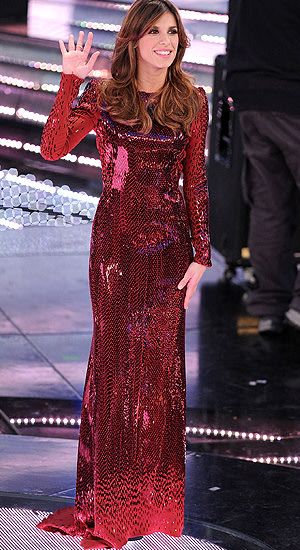
      Jane Fonda (Venturelli/WireImage)                         Elisabetta Canalis (Venturelli/WireImage) 


Fonda, 74, donned the dress for the premiere of animated film "Madagascar 3: Europe's Most Wanted" at the 2012 Cannes Film Festival in France in May. The Oscar-winning actress/workout guru/all-around-cool chick finished her look with Chopard jewels.
[Related: Jane Fonda talks about aging]
Canalis, 33, debuted the dress as she hosted the 2011 Sanremo Music Festival in Italy in February 2011. She left her hair down, and made her look all about the creation from Cavalli, one of her favorite designers.
[Related: Elisabetta Canalis says relationship with Steve-O 'doesn't feel over yet']
This gown is gorgeous! I love the color, and the sequins really give it that extra oomph — as if either woman needs it! Canalis looks like, well, a model. And Fonda? The "Newsroom" actress looked fabulous for a woman of any age. Did I mention that she's technically a senior citizen? These ladies didn't make the decision easy, but I'm calling this one for ... Fonda! Now I hope she'll reveal her secret to looking so foxy at 74. Do you agree with my choice?

Original Post Found Here..
http://omg.yahoo.com/blogs/the-thread-omg/jane-fonda-vs-elisabetta-canalis-fashion-faceoff-002050614.html

Bald eagle steals catch from fisherman’s pole (PHOTOS)


A bald eagle swoops down onto Bruce Huntley's fishing line. (RickWarren/Bellingham Herald)Fishing buddies Bruce Huntley and Rick Warren were enjoying a relaxing day on Washington's Lake Padden. Huntley was reeling in one of the lake's rainbow trout when a massive, 6-foot bald eagle swept down from the skies and stole Huntley's catch directly off his fishing line.
"I noticed the eagle had been watching us from the tree, did one circle, went right over his head. I yelled 'watch out,' Warren told Yahoo News in a phone interview.
Warren, an aspiring photographer, says he'd heard stories of birds stealing fish from humans on Lake Padden, but neither he nor Huntley had ever seen anything quite like the bold eagle that literally snapped Huntley's fishing line and flew off with his catch.
"He was a little shocked," Warren said of Huntley's reaction. "He said you could almost feel the compression coming off the wings, less than a foot from his face."
"He came out of the tree and scared the holy bejesus out of me," Huntley told the Bellingham Herald.
About a week later, Huntley and Warren returned to the lake and attempted to recreate the scene. At first, Huntley caught a few smaller fish. But those didn't really seem to capture the attention of the male eagle, which Warren said appeared to be developing a method for snatching free meals from fishermen on the lake.
Eventually, Warren was able to catch a stunning photo of the bald eagle in action, attempting to steal a trout off of Huntley's fishing line.
They also noticed that the eagle has a mate, whom he takes the stolen fish to before returning for another round. "She was just squawking at him, waiting for her lunch," Warren joked. "We're just bringing the fish to the surface for him."
Warren submitted his photos to the Bellingham Herald, and they have been generating significant interest from outdoor enthusiasts and casual viewers alike. However, not everyone believed the action shots were entirely legitimate.
"I sent the photos to my family, and they were looking at them on their iPhones," Warren said. "My Dad said, 'those have obviously been photoshopped. There's no way they are real.'"

Warren said he would eventually like to become a full-time professional photographer and says all of the unexpected attention has been welcome.
"It's been great," he said. "It's all been a lot of more than either of us expected.

 Original Post Found Here..
http://news.yahoo.com/blogs/sideshow/bald-eagle-steals-catch-fisherman-pole-photos-203014992.html


9 electric cars you can actually buy in 2012

9 electric cars you can actually buy in 2012


Tesla Model S at the factory

A new batch of electric cars is joining the big names on the market such as the Nissan Leaf. So we thought it was time to catch up on the EV scene and see how the new entrants stack up. More electric cars are coming, too, including the two-seaters Mini E, Smart ForTwo, and Audi E-tron, and four- and five-seaters Scion iQ EV, Volkswagen E-Up and E-Golf, and a Cadillac ELR version of the Volt.

Tesla Model S
Range:
265 miles
Price: $92,400

The EPA rates the Model S passenger car, the newest offering from Elon Musk's EV company, at 89 mpge. And thanks to an enormous battery pack, the Model S is expected to make 265 miles on a charge. So far, the company says it has 7000 reservations.

Related: Our test drive of the Tesla Model S


Coda Sedan
Range:
88 miles
Price: $37,250

Built by a small California company using a Chinese-made version of a Japanese Mitsubishi Lancer as a platform, the Coda runs on a unique lithium-phosphate battery instead of the more common lithium-ion. EPA rates the Coda as a subcompact, though the four-door sedan will carry five people. Those who've gotten the chance to drive one have generally come away with a good impression of the EV, which gets brisk acceleration from its 134-hp electric motor.


Ford Focus EV
Range: 76 miles
Price: $39,995

The Ford Focus EV will be offered only in California, New York, and New Jersey as it is slowly released to the public. But during our drive, we found the Focus EV to be quick and quieter than a gasoline-powered model on the road. One big plus for the electric Focus is its high-capacity 240-volt onboard charger, which lets you top off the battery in less than 4 hours.


Honda Fit EV
Range:
123 miles
Price: $36,665

We just got our first drive in the electric version of a car we really like, the Honda Fit. We expect the five-seat Fit EV to be rated as the longest-range passenger EV—the automaker says you'll get 123 miles on a charge. Honda is rolling out the vehicle conservatively; it will be sold only in California and Oregon later this year, and, like the Toyota RAV4 EV, it will have a small production run: just 1100 cars for the next three years.


Mitsubishi i-Miev
Range:
62 miles
Price: $27,900

The bubble-shaped subcompact i-Miev is a dedicated electric car design (not a gasoline car converted to run on batteries) with its motor in the rear driving the rear wheels. The bad: It's the slowest accelerating electric we've driven, getting to 60 mph in about 15 seconds. The good: Despite the pokey acceleration, it feels lively on the road while getting a score of 112 mpge from the EPA. And it's much less expensive than a Nissan Leaf or a Ford Focus EV.


Ford/Azure Dynamics Transit Connect EV
Range:
56 miles
Price: $58,000 (est.)

Available as a small panel van or a passenger wagon, the electric version of Ford's heavy-duty front-drive tall wagon can carry up to 1000 pounds of cargo, so it's aimed at customers who need utility. The Transit Connect EV delivers that utility, but with a range just north of 50 miles and an efficiency of just 62 mpge. For comparison, a passenger car like the Ford Focus EV is rated at 105 mpge.


Nissan Leaf
Range:
73 miles
Price: $35,200

The biggest name of the all-electric offerings currently on the mark, the Leaf is now available in 30 states, and Nissan has sold 27,000 of them worldwide as of April. The standard-bearer is roomier inside than the Focus EV or even Chevy's hybrid Volt. The EPA rates its efficiency at 99 mpge, which means it makes good use of its battery capacity, although it requires more time to charge than the Focus.


Wheego LiFe
Range:
100 miles (est.)
Price: $32,995

Wheego has sold less than 40 of the tiny Smart ForTwo-size LiFe in the past year, though that's not unusual in the low-volume world of EVs (Ford sold just 10 of its Focus EVs in the first three months of 2012.) The two-seater LiFe is a product of Wheego's build-to-order assembly strategy, where each car ships without drivelines from China and is finished in Atlanta. The company also sells a low-speed golf-cart-style electric vehicle called the Whip, though the LiFe is the more powerful of the two.


Toyota RAV4 EV
Range:
80 miles
Price: $49,800

The second iteration of a Toyota RAV4 EV (which is intended for consumers, as the first-gen was for commercial and government clients) is expected to be on the road in late autumn, and to have some zip when it arrives. Toyota says the large Tesla-sourced battery pack will accelerate the car to 60 mph in just 7 seconds when it's in sport mode, while in normal driving mode, the RAV4 EV will still get to 60 in 8.6 seconds. The EV version of the RAV4 is only available as a front-driver, not a four-wheeler. Toyota expects to build 2600 RAV4 EVs over the next three years in its Ontario plant.


Original Post found here..
http://autos.yahoo.com/news/9-electric-cars-you-can-actually-buy-in-2012.html?page=all